
Hibu One Websites – FAQs ↓
A Smarter Website, Built for Today’s Digital Marketing
The Hibu One Smart Site is more than just a website—it’s the engine of your entire digital marketing strategy. AI-optimized for search visibility and purpose-built to drive conversions, your Smart Site combines personalized content, intelligent design, and performance-first structure to help your business get found and chosen online.
Unlike generic website builders or outdated site models, Hibu One Smart Sites are crafted from in-depth consultations with real business owners, then enhanced with AI-driven insights and refined by expert copywriters. They’re designed to sync perfectly with your full marketing program—from listings and ads to reputation management—creating a consistent, credible, and conversion-focused presence across the web.
With improvements in content depth, design strategy, and technical performance, Hibu One Smart Sites outperform legacy solutions and third-party platforms like Wix or WordPress—especially in the age of AI search and evolving SEO algorithms. From mobile-first responsiveness to faster load times and richer service-level detail, every aspect is built to help your business stay ahead, rank higher, and convert more leads.
It’s the modern website your marketing deserves—powered by AI, backed by strategy, and built to grow with you.
Why Hibu One
Richer Content
Page-Level FAQs
Smarter Design
Mobile-Perfect
Faster Load Times
SEO Optimized
What You Could Be Missing
Depending on when your SOP Smart Site went live, you could be missing one or more of the following features:
Functionality
- Reviews Header Widget
- Contact Form in Header
- Blog Widget on All Pages
- Related Services Widget
- Recent Reviews Widget
- Form in Hero (Superhero)
- Instagram Gallery
- Google Calendar / Favicons
- Open/Close Widget
- Assistant Banner
Design
- Mobile Menu Design
- Transparent Header
- Sticky Header
- Desktop Hamburger Menu
- Color Palette Changes
- Callout Designs
- Coupon Designs
- Video Splash
Content
- Updated Headline Spec
- Updated Motivating Factors Spec
- Updated Title / Meta Descriptions Spec
- Added Reviews Content on Homepage
- Motivating Factors Section
- Word Count Increases
Contact Preferences
- Replace Call Buttons with ‘Call or Text’
- Replace Call Button with a Multi-Phone Button
Performance
- Speed Enhancements for Core Web Vitials
- Expand Site width to 1200px
- Refresh All Widget Code
Hibu One Smart Sites FAQs
Do image tooltips (title attributes) matter for SEO, and can we be penalized for not using them?
No — — image tooltips ( title attributes) aren’t important for SEO. Browsers often show it on hover, but it’s optional and mostly a UX nicety.
What matters: alt text. Google uses it to understand images, improve accessibility, and rank in image search. Tooltips: Optional; they don’t impact rankings and aren’t required. Penalties: None for leaving tooltips off. The only risk is missing alt text on meaningful images, which hurts accessibility and image SEO.
Why Hibu One Websites are an Upgrade from Hibu Smart Sites
Hibu One Smart Site are our newest, most advanced websites—built to help businesses get better results online. They go beyond what Hibu Smart Sites provide, with improvements in content, design, SEO, and performance. They’re important changes for any business that’s concerned about keeping their website modern, highly visible, and performant - especially in light of ongoing changes within Google’s ranking algorithms, and recent market changes from AI, including the introduction of Google’s AI Overviews and the rise of AI Search services like ChatGPT and Perplexity.
Specific improvement include:
1. Content: Stronger, More Customized Content
- Increased Content & Word Count on Every Page = Better Visibility
Each page has more written content, which helps search engines understand what the business does and increases the chance of showing up in search results. - Content that is Tailored to the Business and the Industry
Unique business content collected during consultation is fused with industry knowledge and facts to create content that’s both relevant and personalized - Page-Level FAQs
Each service or product page can have specific FAQs that answer common questions customers are asking online, helping improve search rankings and conversions.
2. Design: Smarter Design That Works Harder
- Strategic Use of Images and Offers
Photos and promotional elements like coupons are placed where they have the most impact, helping drive more engagement and leads. - Responsive Design, Done Right
These websites are built to look great and work smoothly on phones, tablets, and desktops—essential for modern users and mobile-first search engines.
3. Performance: Built to Win in Search Results
- Improved Core Web Vitals
Hibu One Websites score, on average, 11 points higher on Google’s Core Web Vitals—measuring speed, interactivity, and layout stability. This helps with SEO and gives users a better experience. - Better Titles, Descriptions, and Breadcrumbs
Every page includes clear, optimized title tags and meta descriptions that are created with the assistance of AI. Breadcrumbs make the site easier to navigate and help search engines understand its structure. - Individual Pages for Each Product or Service
Instead of grouping everything together, we create separate, focused pages—this gives each service a better chance of ranking well in search.
In summary, Hibu One Smart Sites provide clients more ways to get found online, more chances to turn visitors into customers, and more modern tools to stay ahead of the competition. They’re faster, smarter, and more effective, built to deliver the kind of results today’s businesses need.
Why Hibu One Smart Site Over a 3rd Party Websites?
Hibu One Smart Sites are at the center of digital marketing for SMBs. Hibu One Smart Sites are built to, and focus on, optimizing for conversion and lead generation. They are written using extensive content gathered from detailed conversations with the client, while also leveraging the power of AI to incorporate industry facts and are then edited and humanized by Hibu’s team of experienced copywriters. Hibu One Smart Sites are tuned to align completely with the goals of the client and the rest of their digital marketing campaign, from listings management to ad campaigns to reviews and everything in between. The detailed information and synchronization across the account increases trust, authoritativeness, search and AI ranking and visibility, and conversion rates, thus generating more leads for the business.
What Features Might Be Missing From My SOP Smart Site?
Depending on when your Smart Site was originally built, there may be features and enhancements that weren’t yet available at that time. Every rebuild is designed to take advantage of today’s best practices and functionality, so a refreshed site often adds capabilities that improve performance, usability, and design.
Some examples of features that may not be included in older sites include:
- Design & Layout Enhancements – transparent headers, dynamic rows, “Super Hero” layouts, assistant banners, and improved “Contact Us” page designs.
- Interactive & Visual Elements – countdown timers, video splash pages, video on internal pages, Instagram galleries, and enhanced review displays.
- Functionality Upgrades – Google Calendar integration, open/close widgets, site comments, and improved engagement menus.
- Performance & Standards – updates for Core Web Vitals, indexing improvements, and other behind-the-scenes enhancements that help with search visibility and speed.
- Content & Branding – favicons, content libraries, and updated banners to keep branding modern and consistent.
The important thing to remember is that a refresh isn’t just about adding features one-by-one—it’s a full rebuild on the latest platform standards, ensuring your site performs and looks its best moving forward.
What should I expect to happen to site traffic and leads during a Hibu One upgrade?
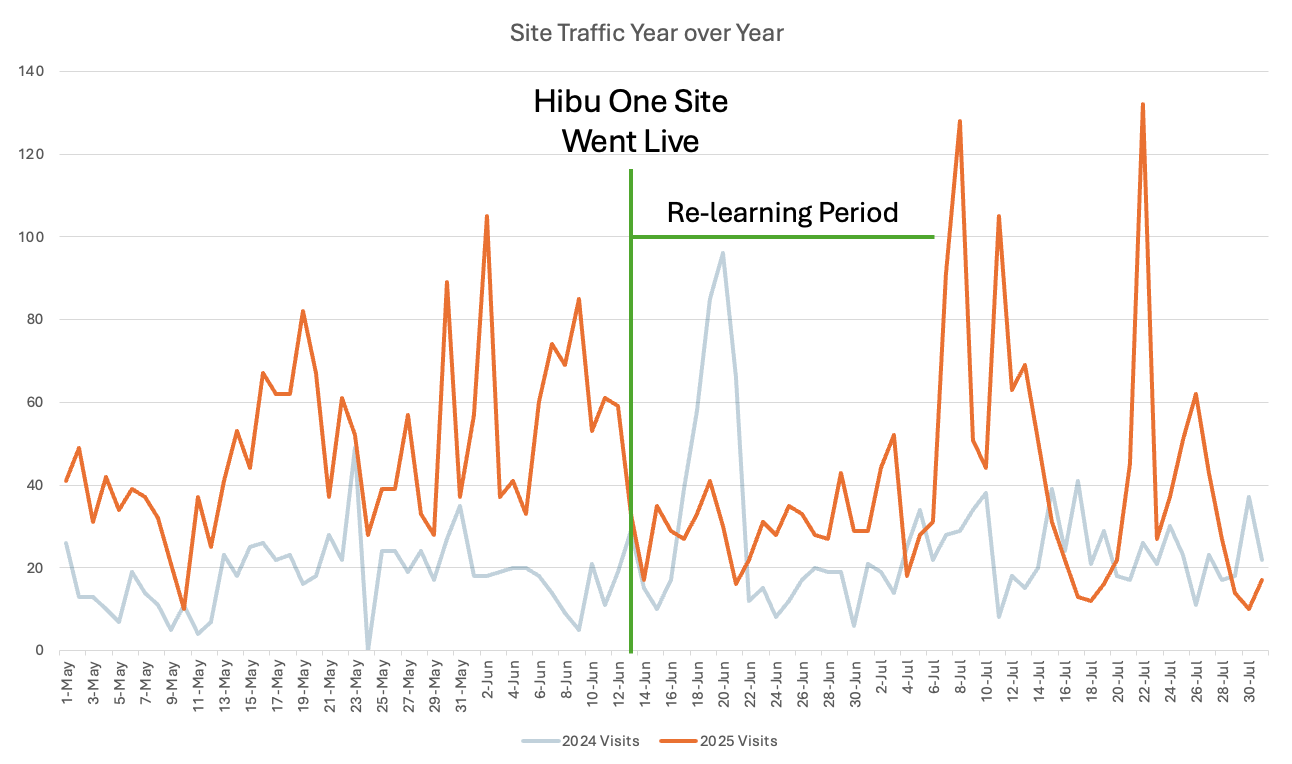
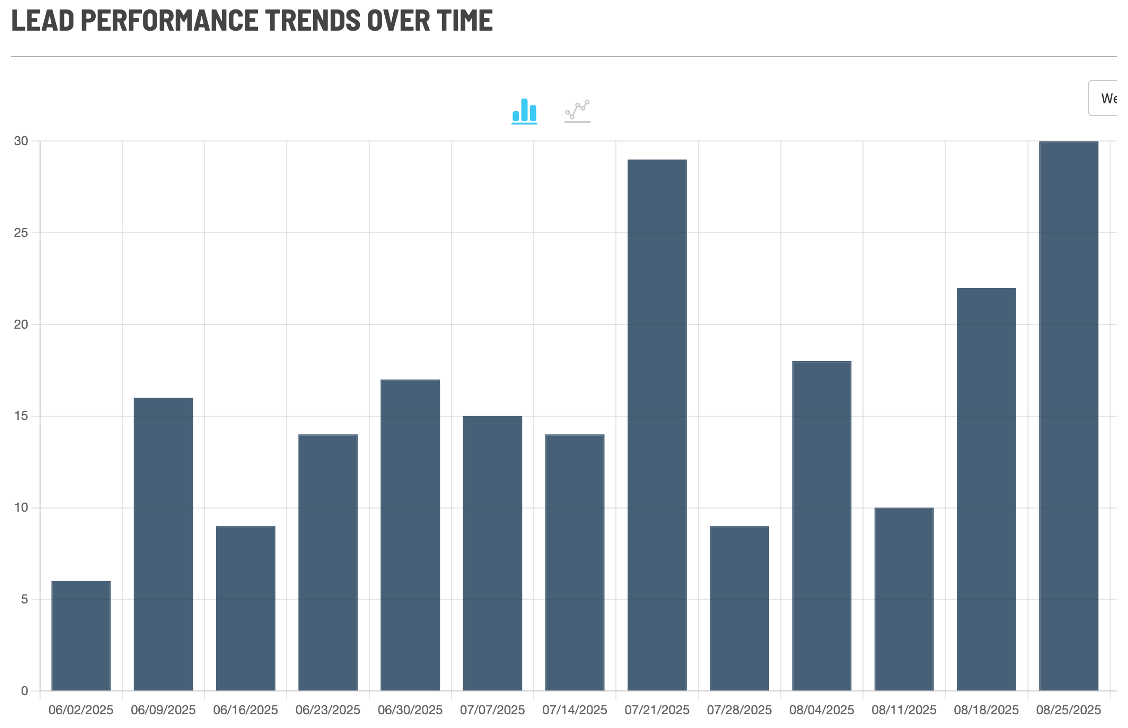
There is a “re-learning” period for Google when you update a site. In the case of Hibu One Sites, unless requested, the same domain is used and the old site is simply added to and updated, not taken down and replaced. This helps our sites experience a typical readjustment period of 7-10 days. During the "re-learning period", we also typically see leads stay consistent so the overall client impact is minimal.
Where can clients find the site comments tutorial video?
The site comments tutorial video can always be accessed here: How to Use Site Comments.
Here’s how to leave site comments depending on the version of the website editor:
- Previous Website Version: Look for the message bubble with a plus sign. Click the bubble, then click anywhere on the site to leave a comment.
- Hibu One Website Version (new editor): Look for the message bubble with three dots in the upper right-hand corner. Click the bubble, then click anywhere on the site to leave a comment.
Can we build the site in Spanish, even if the client provides the copy?
No — Hibu Smart Websites are built in English. The site itself does not automatically convert into other languages, even if a client were to provide Spanish copy.
However, modern browsers and devices (like Chrome, Safari, and mobile phone browsers) have built-in translation features. When someone with their phone or browser set to Spanish visits the site, the browser will typically prompt them to automatically translate the page. This happens seamlessly for the user and works across most major languages.
In short, while the website content will be created in English, visitors can rely on their device/browser to view it in Spanish (or another preferred language).
Can existing blog posts be moved to a Hibu website?
- From an older Hibu site to a new Hibu One site: Yes. All blog posts can be imported with no limitations.
- From third-party sites: In some cases, blog posts can be imported, but it depends on the platform and how the original blog was created.
- WordPress: Up to the most recent 110 posts can be imported.
- FindLaw: Up to the most recent 10 posts can be imported.
- Other platforms: If the “blog” is really just a set of static pages, import may not be possible.
If we cannot import the blog, the client would need to manually recreate their posts on the new site.
Can extra location pages be added to a Hibu One site without the without the additional location add-on?
Yes — a client can have one or multiple simple location pages without purchasing the full additional location package. However, there are important limitations:
- These location pages will be basic, static “Contact Us” style pages with location details.
- They will not be connected to Yext or benefit from listings management.
- If the site exceeds 20 total pages, the client will also need to pay the standard $5 per additional page fee.
In short, clients can display multiple locations on their site, but without the additional location package, those pages will be static only and will not include the enhanced features that come with Yext integration.
How does a Hibu One Smart Site use AI and SEO to help businesses get more leads?
A Hibu One Smart Site is designed to be clear and easy for search engines and AI tools to understand.
Each site includes several types of schema — behind-the-scenes details that help define what each part of the site means:
- Website Schema: Helps search engines recognize the website as the main online home for the client’s business.
- Local Business Schema: Highlights the client’s business name, address, phone number, hours, and service areas — so it appears correctly in local and map results.
- FAQ Schema: Allows common customer questions and answers to appear directly in search results, increasing visibility and clicks.
- Breadcrumb Schema: Clarifies how the site’s pages connect, making it easier for search engines (and visitors) to move through the site.
- Blog Schema: Helps articles appear as featured posts or in “Discover” results when people search for related topics.
- Video Object Schema: Makes videos easier to find in search and helps them display with thumbnails and key details.
In addition to schema, every Smart Site includes an
llms.txt file — a machine-readable file that signals to AI tools (like large language models) how to interpret and use the site’s content. Similar to how a
robots.txt
file guides search engine crawlers, the
llms.txt
file provides AI systems with clear context about the business, the type of content on the site, and how that content can be used or referenced.
Together, schema and the llms.txt file ensure that both search engines and AI systems understand not just what’s on the site, but what it means.
All of this structured information makes a client’s website more AI-ready, helping their business appear in richer, more visible search results — and making it easier for potential customers to find and trust them.
At the same time, off-page SEO strengthens a client’s overall online presence and reputation.
It builds the authority and trust that search engines — and potential customers — look for when deciding which businesses to feature most prominently.
By expanding visibility beyond the website, off-page SEO reinforces the signals that show a client’s business is active, credible, and dependable.
By combining schema, llms.txt, and off-page SEO efforts, Hibu creates a strong foundation for visibility and lead generation.
Schema and llms.txt help the site get noticed and understood. Off-page SEO helps the business get trusted.
Together, they make it easier for the right customers to find your client — and more likely for those customers to reach out and become leads.
Design FAQs
What is the Hibu One Website Design & Rebuild Policy?
Hibu One Website Design & Rebuild Policy
Hibu Policy
Hibu One Smart Sites are built to perform — not just to look good. Every site follows proven layouts that are clean, conversion-focused, mobile-friendly, and optimized for speed and search.
We do
not replicate outdated designs, honor ad hoc layout requests, or revert to previous specifications. Instead, we use a standardized, data-backed approach that ensures better results for clients.
That said, we will attempt to make a client’s new Hibu One Smart Site look as much like their old site as is feasible. A typical consumer revisiting the site should “feel like” they’re engaging with the same business.
Whenever possible, we should try to convince clients to go get to the Proof stage. Debating hypotheticals isn’t productive, and 95% of the time when a client sees what we build they are happy with it and just want a few tweaks.
Why We Use Proven Layouts
Our design standards aren’t arbitrary. They are based on:
- User Behavior Data: Real-world analytics showing what works.
- SEO Best Practices: Structured layouts and headings that improve search visibility.
- Conversion Strategy: Each element is placed to drive calls, form fills, and quote requests.
- Performance Benchmarks: Clean code that meets Core Web Vitals for fast, mobile-friendly pages.
Following these standards ensures:
- A consistent, high-quality product across all Hibu One Smart Sites
- Faster build times and easier maintenance
- Clear expectations across sales, design, and support teams
- Better long-term results: more leads, better engagement, stronger brand perception
Why We Don’t Honor Old Designs or One-Off Layout Requests
We avoid outdated design specs and custom one-offs for several reasons:
- Mobile-First Comes First: Most visitors view websites on their phones. Our layouts are designed mobile-first to ensure pages load quickly, display cleanly, and convert on small screens. Mobile-first design isn’t just about convenience — it directly affects conversions and SEO rankings. A slow or cluttered mobile site can cost leads and hurt visibility in search.
- Proven Patterns Work: Our layouts are based on data — not personal preference.
- SEO-First Decisions: Changing heading structure or element order can hurt search rankings.
- Conversion Impact: Moving forms or calls-to-action risks lowering response rates.
- Consistent User Experience: Visitors expect certain elements in familiar places.
- Speed & Performance: Old designs often include slow sliders, heavy images, or extra widgets that hurt mobile speed scores.
- Scalability: Standardized layouts make future updates faster and testing more reliable.
- Brand Integrity: Random, untested changes risk making a site look inconsistent or unprofessional.
Core Design Principles
1. Professionalism That Converts
Each design presents a polished, trustworthy online presence.
- Hero sections feature a clear headline (H1), subhead (H2), motivating copy, and strong call-to-action — with no visual clutter.
- Client images (trucks, storefronts, team photos) are used strategically, usually below the hero or on the About Us page, to avoid reducing readability.
2. User Experience That Drives Action
Navigation and layout are designed for intuitive, frictionless flow across desktop, tablet, and mobile.
- All paths lead to key actions — call, form submit, or quote request.
- Buttons, forms, and CTAs are placed exactly where users expect to find them.
3. Performance & Page Speed as Non-Negotiables
Speed and usability are prioritized from the start.
- No auto-playing video or sliders above the fold.
- No extra header widgets or scripts that slow performance.
- Sites are mobile-first and optimized to meet Core Web Vitals.
4. Purposeful Element Placement
Key information is always where it belongs:
- Header phone number and hero CTAs are fixed and prominent.
- Hero forms are short (about four essential fields) to encourage completion.
- If location is needed, one short field (City/State or ZIP) is acceptable.
Content, SEO, and Site Rebuild Process
When upgrading to a Hibu One site:
- Content Carryover: Text, images, and assets from the old site may be carried forward if they are current, accurate, and align with Hibu One Smart Site design and SEO standards. Content that is outdated, redundant, overly long, or not optimized for performance will be refreshed or rewritten to fit best practices.
- Geo Pages: Can be included by purchasing Geo Pages as part of your Hibu One Solution
- 301 Redirects: We set up redirects from old pages to preserve SEO value and prevent traffic loss.
- Local Ranking Optimization: Our team may retain existing title tags and meta descriptions or re-optimize new pages for better performance, depending on which approach is most effective.
Ranking Expectations After Launch
Important: It’s normal to see search rankings dip immediately after launch. This is because Google needs to re-index the new site. Rankings usually stabilize and start improving within 7 to 10 days, especially with Local Ranking optimizations in place.
Why Can't You Make My New Site Look Like My Old One?
We’ll make every effort to carry over the look and feel of your old site — including your logo, images, colors, and other key brand elements — so your new Hibu One Smart Site still feels like yours. What we don’t do is copy entire old layouts. Smart Sites are an upgrade, not a replica, and they’re built on proven, modern best practices. The layouts are designed to be faster, more secure, and more effective at generating leads. If there are specific images or text you want us to keep, let us know and we’ll review them for the new design. Let us build your Smart Site to spec first — we think you’ll be pleased with the result — and then use the proofing process to request any adjustments.
More Information
Your new Smart Site isn’t a “new skin” on your old site — it’s a complete upgrade. Old designs often had heavy elements or cluttered layouts that hurt rankings, slowed down performance, or confused visitors. Smart Sites are built on modern, tested patterns that improve SEO, boost speed, and guide visitors toward taking action. By blending your familiar branding with these proven layouts, we give you a site that looks like yours while performing much better.
Considerations
- Outdated layouts will not be replicated.
- Content may be reused in new, more effective placements.
- GEO/Service Area coverage requires the Local Ranking Program.
- 301 redirects preserve SEO rankings from old URLs.
Alternative Options
- Provide updated photos or content for better placement.
- Use an Alert Banner for short-term announcements.
- Add Service Area Pages for improved location-based SEO.
What Carries Over / What to Do Next (Internal Note)
- Text, images, and SEO value carry forward if still relevant.
- Redirects are set to protect rankings.
- Internal teams should review client-provided content for fit within Smart Site layouts.
Why
Hibu One Smart Sites don’t replicate old designs because:
- Site Performance – Optimized to meet Core Web Vitals.
- SEO Best Practices – Structured for Google indexing.
- AI-Friendly Content & Structure – Ready for AI-driven search tools.
- User Experience – Familiar layouts reduce friction.
- Conversion Strategy – Design choices maximize calls and leads.
- Design Consistency – Ensures a polished, trustworthy look.
- Operational Efficiency – Easier updates and scalability.
Why didn’t you carry over my old text?
We didn’t carry over your old text because Hibu One Smart Sites use fresh, SEO-optimized copy written for today’s audience. We rewrite text to help your site rank better in search, perform well with AI-driven tools, and convert more visitors into leads. If there’s specific text you’d like to keep, just let us know — we can review and include it where it fits with the new layout and SEO standards.
More Information
Older text is often too long, outdated, or not structured for modern SEO and AI-driven search. Fresh copy is concise, scannable, and action-focused, making it easier for visitors to read and engage. It also follows best practices for keyword placement, headings, and persuasive language to help increase conversions.
Considerations
- Old text may not follow current SEO best practices.
- Long, outdated text reduces readability and conversions.
- Fresh copy is written to align with AI, SEO, and user behavior.
- Clients can request review of specific old text sections.
Alternative Options
- Provide updated text for adaptation to modern standards.
- Identify specific lines, taglines, or descriptions you want preserved.
What Carries Over / What to Do Next (Internal Note)
- Old text is not automatically carried over.
- Client-requested sections may be reviewed and integrated.
- Copywriters should ensure all included text aligns with SEO and readability standards.
Why
Hibu One Smart Sites don’t carry over old text because:
- Site Performance – Concise copy improves readability.
- SEO Best Practices – Modern structure improves rankings.
- AI-Friendly Content & Structure – Optimized for AI-driven search.
- User Experience – Short, scannable copy improves engagement.
- Conversion Strategy – Persuasive language increases leads.
- Design Consistency – Fresh copy integrates cleanly into layouts.
Why didn’t you carry over my old images?
We didn’t carry over your old images because they don’t meet the quality standards needed for a modern, professional-looking website. Hibu One Smart Sites are built on wider layouts, so older images from 960px sites can look blurry or stretched on a 1200px design. We’ll use high-quality, current images that make your business look its best. If there are specific photos you’d like us to include, or if you have newer, higher-resolution ones, just share them with us — we’ll place them where they’ll have the biggest impact.
More Information
When upgrading to a Smart Site, images need to be large enough, clear enough, and current enough to display well in a modern design. Old photos often don’t scale properly, which can make the site look unprofessional. To protect your brand, Hibu prioritizes high-quality visuals that load cleanly and support conversions. Even if an image isn’t strong enough for the homepage hero, it may still be used in a gallery or secondary section where it works better.
Considerations
- Older images from smaller layouts may appear blurry or stretched.
- The homepage hero requires large, high-quality visuals.
- Outdated or low-resolution images may not be used at all.
- Strong secondary or gallery placements may still be available for client photos.
Alternative Options
- Provide updated, higher-resolution photos.
- Supply professional or staged images for the hero.
- Use old photos in a gallery if they aren’t suitable for the main design.
What Carries Over / What to Do Next (Internal Note)
- Only images meeting resolution/quality standards should be carried forward.
- Client-provided photos must be reviewed before hero placement.
- Consider secondary placements for lower-quality images to maintain professionalism.
Why
Hibu One Smart Sites don’t carry over old, low-quality images because:
- Site Performance – Crisp, properly sized images improve load speed and display quality.
- SEO Best Practices – Optimized visuals help overall site health.
- User Experience – Clear, professional images build trust.
- Conversion Strategy – Strong visuals encourage visitors to call, click, or fill out a form.
- Design Consistency – High-quality visuals maintain a polished look across all sites.
Why can’t I have InSites or Dynamic Rows on my new site?
We don’t use InSites or Dynamic Rows on Hibu One Smart Sites because they slowed sites down, caused layout shifts, and hurt SEO performance. Instead, we now use a static Alert Banner at the top of the site for announcements, promotions, or business updates. It’s styled to match your branding, loads quickly, and keeps your site performing its best.
More Information
InSites — also called Dynamic Rows or Personalization — were retired because they created problems with speed, Core Web Vitals, and SEO. For example, they often caused pages to jump or shift as they loaded, which both frustrated users and lowered search rankings. On Hibu One Smart Sites, all promotional or time-sensitive content is handled through a static Alert Banner. These banners sit at the top of the homepage, match the site’s style, and deliver a clear, distraction-free message without slowing things down.
Alternative Options
Clients who previously used InSites can now use:
- Alert Banners for short-term notices like promotions, holiday hours, or closings.
- Standard homepage rows for evergreen content (long-term messaging that doesn’t need frequent updates).
Considerations
- Alert Banners are static and must be updated through Hibu.
- Banner text should stay short (1–2 lines max).
- Banners can’t include scripts, auto-updating content, or custom HTML.
What Carries Over / What to Do Next (Internal Note)
- InSites / Dynamic Rows will not carry over from the old site.
- Clients should provide updated wording for promotions, hours, or updates they want displayed.
Why
Hibu discontinued InSites / Dynamic Rows because:
- Site Performance – Faster load times and smoother browsing.
- SEO Best Practices – Better Core Web Vitals, especially CLS (Cumulative Layout Shift).
- AI-Friendly Content – Static messaging is easier for search engines and AI to index.
- User Experience – No more shifting layouts or inconsistent behavior.
- Conversion Strategy – Clear, focused messaging that supports calls-to-action.
- Design Consistency – Standardized banners match modern design standards.
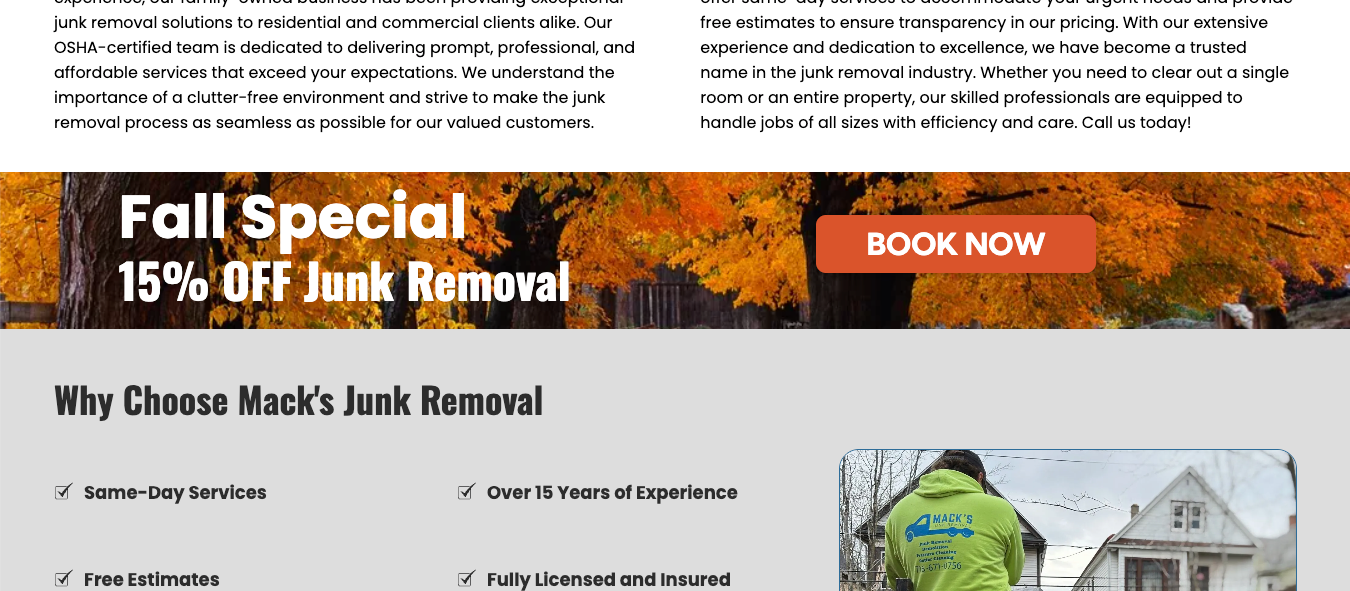
Alert Banner
Seasonal promotion banner placed directly below the hero — keeps the message prominent without cluttering the header.
Why can’t I add more phone numbers to the header?
We don’t allow multiple phone numbers in the header because it creates clutter and makes it harder for visitors to know which number to use—especially on mobile, where space is limited. The header is designed to guide visitors toward one clear action. Showing multiple numbers at once can slow people down, create confusion, and reduce conversions. Instead, we focus on keeping the header simple while still making all contact options available when customers need them.
More Information
Headers are designed to be clear, fast, and conversion-focused. Displaying multiple phone numbers at once can confuse users and slow performance, especially on mobile where space is limited. A poor user experience drives users away — nearly
88% of visitors won’t return to a site after a frustrating experience. To solve this, Hibu uses a “Contact Us” button that opens a clean, device-friendly pop-up. This way, you can still provide multiple numbers, but they only display when someone asks for them — keeping the header simple while making all contact options accessible.
Considerations
- Only one phone number can display in the header at a time.
- The “Contact Us” button opens a pop-up with up to four numbers.
- The solution works consistently across desktop and mobile.
- Keeps header uncluttered and maintains conversion focus.
Alternative Options
- If one number is most important, feature it in the header and list secondary numbers on the Contact page or footer.
- Use call tracking or routing systems so multiple numbers roll into one main contact line.
What Carries Over / What to Do Next (Internal Note)
- Do not place multiple numbers directly in the header.
- Offer the “Contact Us” button + pop-up solution for clients needing more than one number.
- Ensure pop-up is styled consistently with branding.
Demo of “Contact Us” button in the header opening a pop-up with multiple phone numbers —
keeps the header clean while giving customers access to all contact options.
Why can’t I more than 4 fields to the hero form?
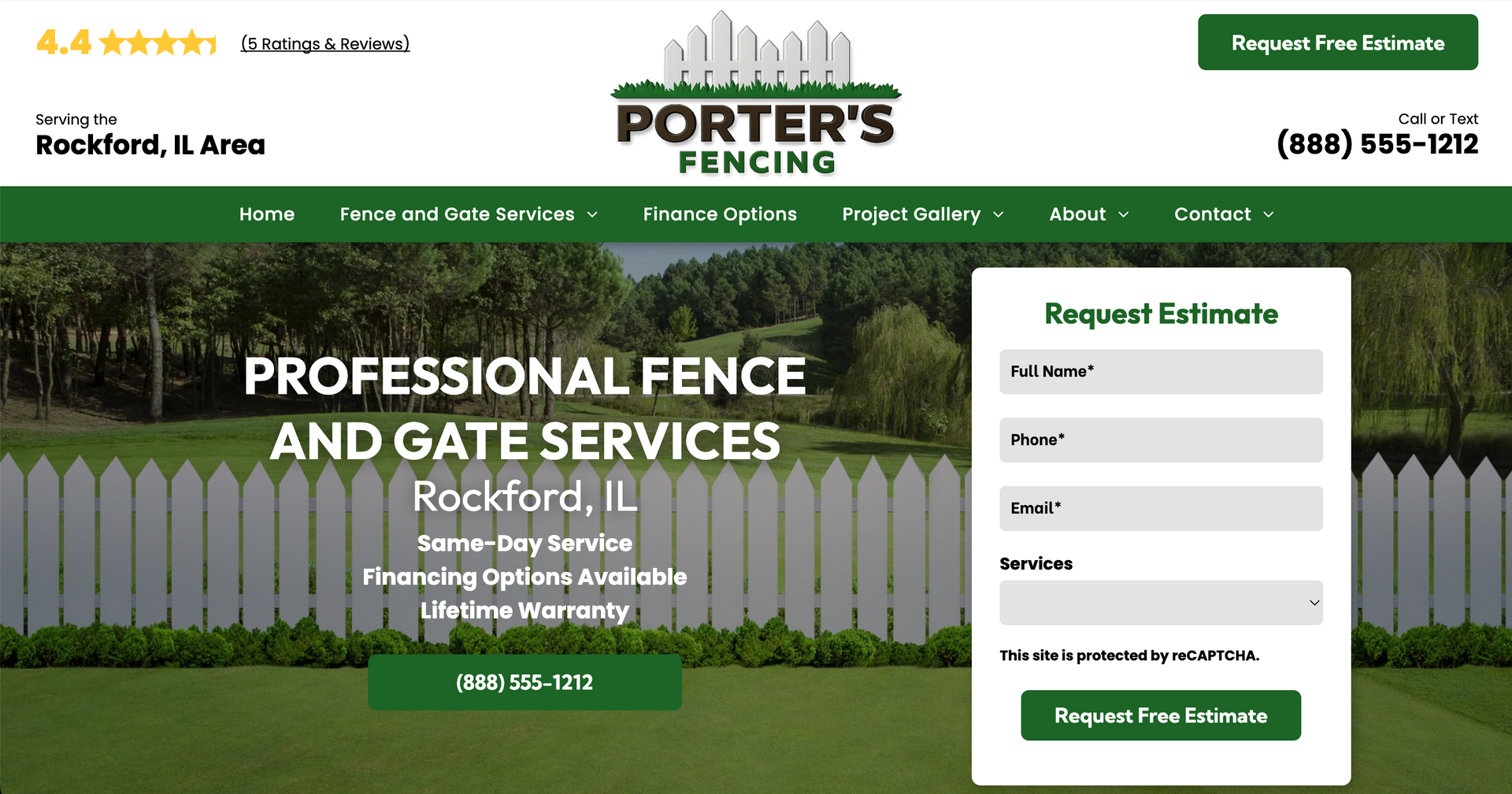
We limit the hero form to four fields because shorter forms get filled out more often — which means more leads for you. Research and our own data show that every extra field lowers the chance of someone submitting. If you need one more piece of information, we can add a single short field — like Zip, City/State, or another quick detail — or an extra dropdown. If you want a longer form with more details, we’ll set that up on a separate page so your main form stays quick and high-converting.
Another reason we don’t recommend updating the hero form is from an operation and build perspective. You’re not just updating one form — you’re updating every single hero form on every single page. That was manageable when only a handful of pages used them, but on large sites with 30, 40, or 50+ pages, it becomes a heavily time-consuming endeavor. And if a client later requests a change, we’d have to repeat the process across every page all over again. For both efficiency and performance, adding additional fields to the hero form it’s simply not recommended.
More Information
The hero form is designed for one job: capture quick leads with as little friction as possible. A simple form — usually Name, Email, Phone, and Service — gets the most submissions. Asking for too much upfront often causes visitors to leave without filling it out.
At the same time, we know some businesses need an additional detail upfront. That’s why our guidelines allow limited flexibility:
- We can swap one existing field for another if a specific detail matters most.
- We can add one (1) optional short field or dropdown as a fifth field. Short fields include things like Zip, City/State, or “How did you hear about us?” — something that can be answered quickly.
- We do not allow long-text boxes or multiple extra inputs in the hero form because they hurt mobile experience and conversion rates.
When more details are needed (like full addresses, project descriptions, or multiple checkboxes), we recommend replacing the hero form with a “Request Information” or “Request an Estimate” button. That CTA takes visitors to a dedicated form page with all the fields the client wants — without hurting the conversion power of the hero.
Considerations
- Standard hero forms include four fields.
- One optional short location field (City/State or Zip) is allowed.
- Long forms belong on dedicated landing pages, not in the hero.
- Protecting mobile user experience is a top priority.
Why
Hibu One Smart Sites limit hero forms because:
- Conversion Strategy – Shorter forms generate more leads.
- User Experience – Fewer fields mean faster, easier submissions, especially on mobile.
- Site Performance – Simple forms load faster and work smoothly across devices.
- SEO & AI-Friendly Structure – Clean, consistent forms support indexing and voice/AI search readiness.
- Design Consistency – Standardized hero layouts keep every site professional and effective.
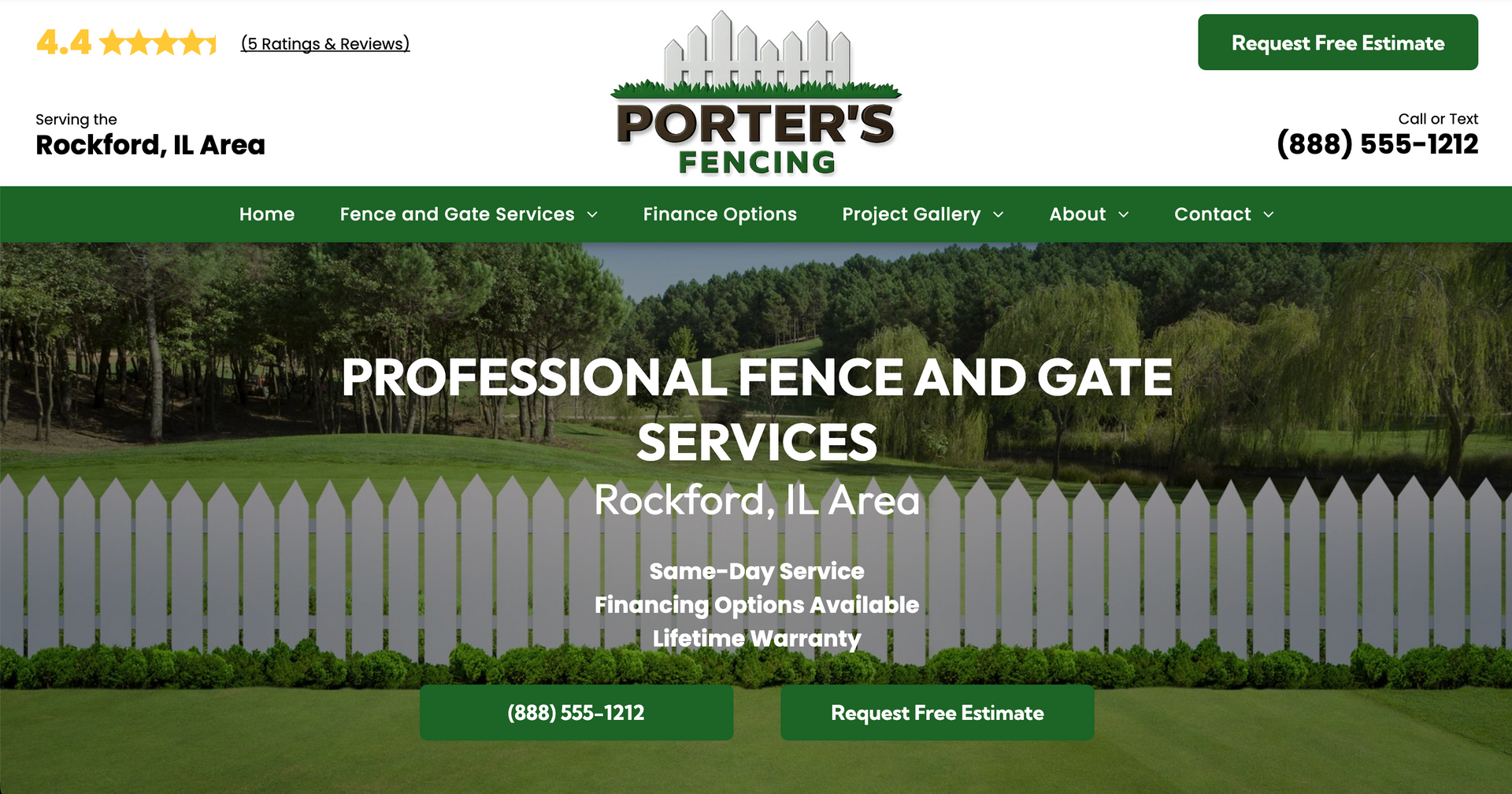
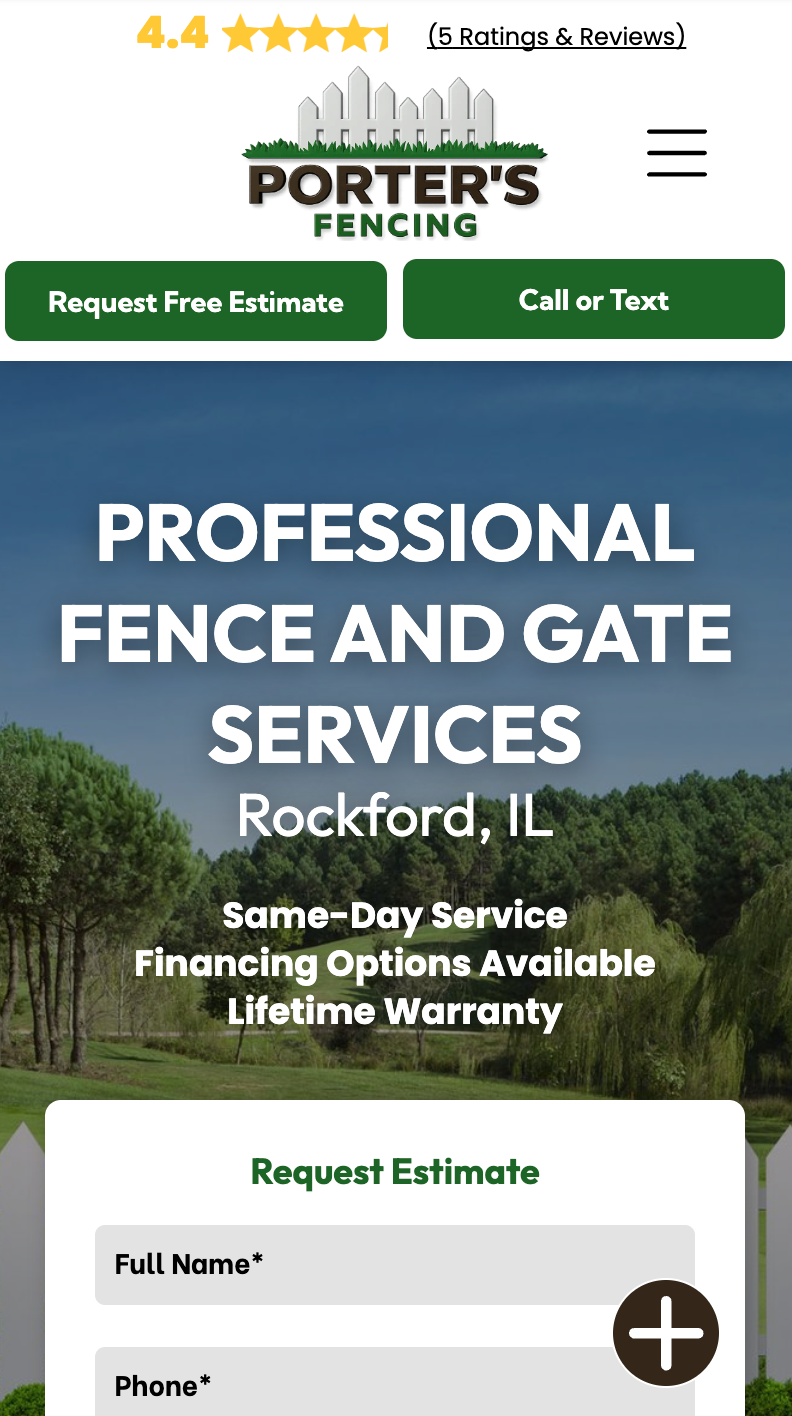

Where is the reCAPTCHA on my form?
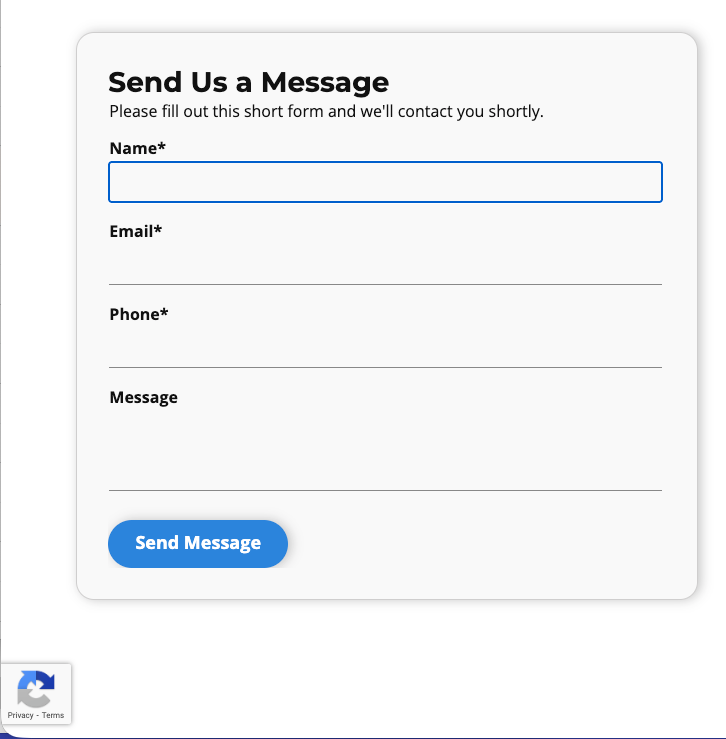
The reCAPTCHA is still there protecting your form, it just won’t show until someone starts filling it out. When a visitor clicks into the form, the reCAPTCHA icon appears in the bottom left corner of the screen. Once they submit the form or leave the page, it goes away. It’s just as secure, but looks cleaner on the site. And if you’d rather have it displayed differently, like back inside the form or in the inline style, we can absolutely set that up for you.
More Information
On newly created Hibu One Smart Sites, the inline reCAPTCHA notification has been turned off. Instead, forms now display a reCAPTCHA icon in the bottom left corner of the screen.
The icon will:
- Only appear when the form is active (for example, when a visitor clicks into a form field to type their name or email).
- Disappear once the visitor submits the form or refreshes the page.
- This update provides the same level of spam protection as the inline version, while offering a cleaner, less intrusive look for your website.
Why can’t I add my full business address to the website header?
We understand why you’d want your address front and center — if customers visit your location, it feels helpful. The challenge is that putting a full street address in the header often creates more problems than it solves. Headers are small, high-impact spaces. When they get crowded, visitors slow down, get distracted, or miss the main action we want them to take (calling, booking, contacting you, and visiting the location). On mobile especially, extra header content can feel overwhelming or even break the layout.
Instead of listing the full address, we focus on keeping the header clean and clear while still letting customers know where you’re located and how to find you easily.
What do you use instead of the full address?
When visiting your location is an important part of your business — and that’s been
clearly defined as a call to action during consultation (for example, “Visit Us," “Visit Our Showroom," etc.) — we don’t rely on a full street address in the header to make that happen.
Instead, we use a clear, consistent “Visit Us” button that works across the entire site and on every device.
Here’s how that shows up for customers:
- A “Visit Us” button in the header, placed opposite your main contact action
- The same “Visit Us” button in every hero section, so it’s always easy to find
- A “Visit Us” button paired with your full address in the footer
- A “Visit Us” button on the Contact page, alongside your location details
- The same experience on desktop, tablet, and mobile — nothing hidden or removed
When clicked, the button takes visitors exactly where they expect: your full address, map, and directions. This approach gives customers a clear, intentional path to visit you — without crowding the header or making them hunt for information.
Important note: The “Visit Us” button is included
only when visiting your location is a confirmed call to action during consultation. If visiting isn’t part of how customers engage with your business, we don’t add it — keeping the site focused and relevant.
How location is shown for brick-and-mortar businesses
- If you have one location
- We show a clear city-based label that matches your physical location.
- Examples
- “Located in Cherry Hill, NJ”
- “Based in Beaverton, OR”
- This keeps the header clean while still answering the “Where are you?” question immediately.
- If you have two locations
- We still keep it concise by listing both cities — no street addresses.
- Examples
- “Locations in Plano & Frisco, TX”
- “Serving Portland & Vancouver, WA”
- This gives customers confidence without overcrowding the header.
- If you have three or more locations (same state)
- Once there are multiple locations, listing every city becomes hard to read. At that point, we move to a regional label.
- Examples
- “With locations across the Lehigh Valley”
- “Serving the Greater Tulsa Area”
- This is clearer, faster to scan
- If you have locations in multiple states
- We use a broader regional or multi-state label that still feels grounded and professional.
- Examples
- “Locations across GA and FL”
- “With locations in NJ, PA & DE”
- “Serving the Tri-State Area”
Why doesn’t my website show an image in Google’s search results like some competitors do?
Google sometimes shows a small image next to organic search results, but this isn’t guaranteed and it isn’t controlled by the website platform — Hibu One or otherwise. Google only displays a thumbnail when it’s very confident that a page’s image is prominent, indexable, and clearly relevant to the search. If Google isn’t sure, it simply won’t show one.
Competitors may be getting thumbnails because their sites are older and more established, and Google may have decided long ago that their images are relevant and reliable to display. That history, combined with clearer on-page images and stronger relevance signals, can give them an advantage.
Even with all of the right elements in place, Google may still choose not to show an image. It’s entirely at their discretion.
What are the Image guidelines for Hibu One Smart Sites?
Image Guidelines for Hibu One Smart Sites
These recommendations help images look clear and professional across desktop, tablet, and mobile.
Recommended Image Sizes
Hero / Background Images
- Width: 1980–2560 pixels
- Best for large, full-width banners at the top of a page
- Use wide (horizontal) images only
Content Images (Photos in the Page)
- Width: 1200–1600 pixels
- Works best for photos inside page sections and featured areas
- Landscape (horizontal) images are recommended
Small Images / Thumbnails
- Width: 150–300 pixels
- Used for icons, small photos, or previews
- Square images work best
Image Shape (Orientation & Cropping)
- Banners / hero images: 16:9 (wide)
- Logos and thumbnails: 1:1 (square)
- General photos: 3:2 or 4:3 (landscape)
Avoid portrait (vertical) images, as they don’t display well in website layouts and may be cropped.
Image Quality
- There is no DPI requirement for websites
- What matters is pixel size, not DPI
- Images should be large enough for where they appear on the page
- Small images stretched large will look blurry
Best practice: Provide images that are at least 2× the expected display size.
File Types
- Use JPG (JPEG) or PNG
- These are ideal for photos, logos, and graphics
- Images are automatically resized for different devices
What options do I have to add an additional button or email address to the desktop header?
We don’t support adding additional or net-new buttons to the desktop header. The header is intentionally kept simple so it stays clear, fast, and easy for visitors to understand at a glance.
That said, we do have an approved and effective way to meet most of these requests —
by repurposing the existing call-to-action (CTA) button.
What does “repurposing the CTA button” mean?
Your site already includes a primary CTA button that’s designed to be highly visible and easy to use. Rather than adding a new button, we can update the text and purpose of that existing CTA to match what you want customers to do.
Common examples include:
- “Client Portal”
- “Email Us”
- “Make a Reservation”
- “Visit Us”
- “Book an Appointment”
As long as the request is fulfilled by changing the existing CTA button — and not adding a second header button — it’s fully supported and compliant.
Will this hurt my site if we replace that CTA?
No — and this is the important part. The CTA button you’re repurposing is already featured prominently throughout the entire site, not just in the header. That means you’re not losing visibility or impact by swapping it.
That same CTA appears:
- In the desktop header
- On every hero section
- In callouts and promotional sections
- Within coupon areas
- Throughout the site copy
- In the footer
- On
all devices — desktop, tablet, and mobile
So instead of removing an important action, we’re simply using that high-visibility button for the action you care about most.
Why don’t you allow multiple header buttons?
This approach is intentional and client-focused:
- It keeps the header clean and easy to scan
- It prevents visitor confusion
- It maintains design consistency across all sites
- It aligns with current platform capabilities
- It avoids scope creep while still offering flexibility
Adding extra header buttons may seem helpful, but in practice it often distracts visitors and reduces clarity.


Why can’t I add more logos, badges, or icons to the header?
We don’t add additional logos, badges, icons, or graphics directly to the header because it clutters the layout and makes it harder for visitors to quickly understand who you are and what action to take. Headers are designed to be simple, fast, and easy to scan. Adding extra imagery—especially on mobile—can reduce clarity, slow performance, and create visual confusion.
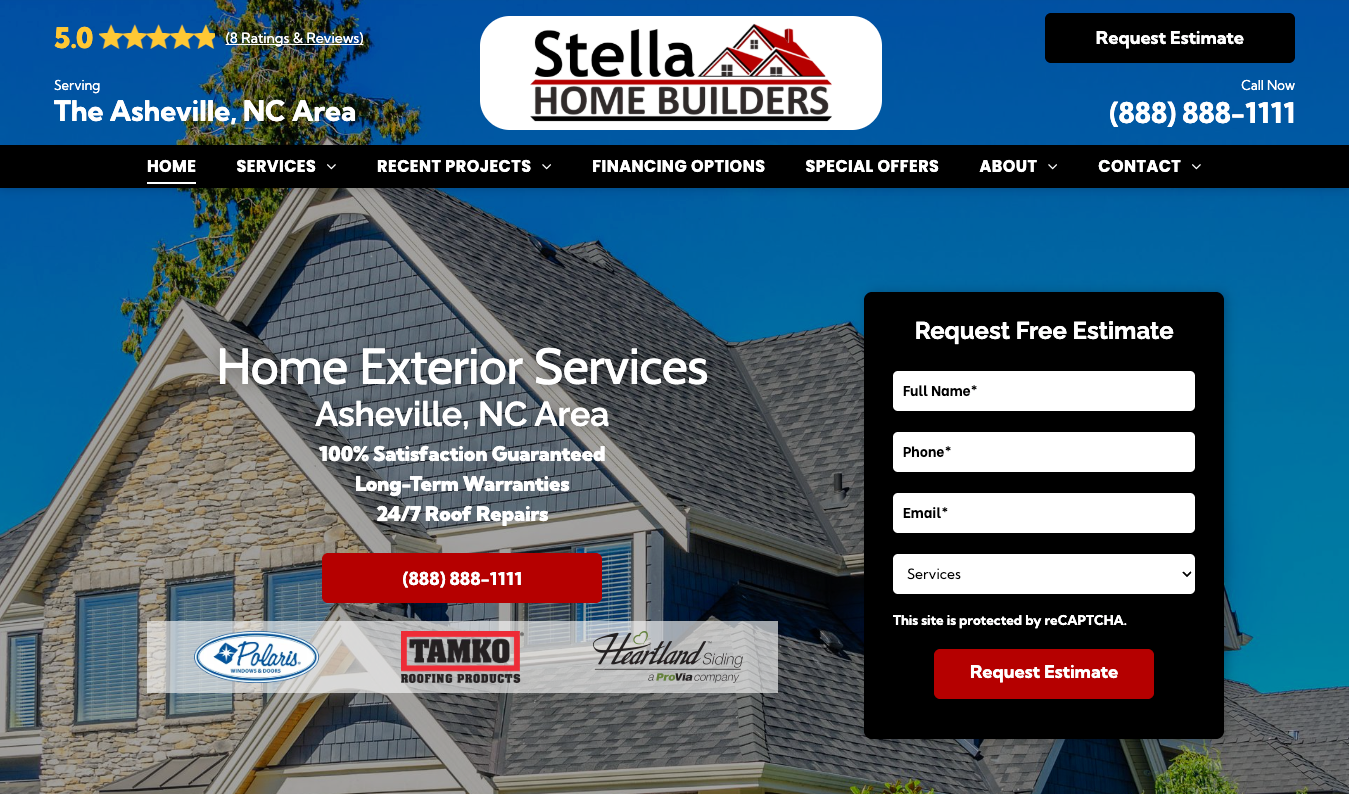
Instead, we place certifications, affiliations, awards, and partner logos just below the primary call to action, where they remain highly visible without overwhelming the header.
More Information
The header is one of the most important areas of the site. When it becomes visually crowded, visitors are more likely to hesitate, miss key actions, or abandon the page—particularly on smaller screens. Rather than stacking multiple logos or badges into the header, Hibu surfaces these trust signals directly beneath the hero call to action. This keeps the header clean while still reinforcing credibility early in the experience.
Important Rule: Multiple Business Logos
We do not support adding more than one client logo to the header under any circumstances.
This most often comes up when two businesses operate under one roof or when a client wants a single site to represent multiple brands. Placing multiple logos in the header—or the hero—creates immediate confusion about who the site is for.
If needed, we can create a dedicated page for a specific service and incorporate a secondary logo within that page’s content. Multiple business logos are never placed in the header.
Why can’t my tagline appear directly under my logo in the header?
We don’t place taglines directly under the logo in the header. While this was something we supported in the past, tagline length is difficult to control, and over time it led to crowded headers, inconsistent layouts, and poor readability — especially on mobile.
To keep the header clean, fast, and easy to scan, we limit it to the most essential elements: your logo, navigation, and primary calls to action.
More Information
The header is one of the most constrained areas of the site. Even a short tagline can cause spacing issues, wrapping, or misalignment depending on screen size, device, or translation length. Rather than forcing a tagline into a space where it may not consistently work, we place it where it can be clearly read and fully appreciated.
This ensures your message is seen — without compromising usability or design quality.
What do we do instead?
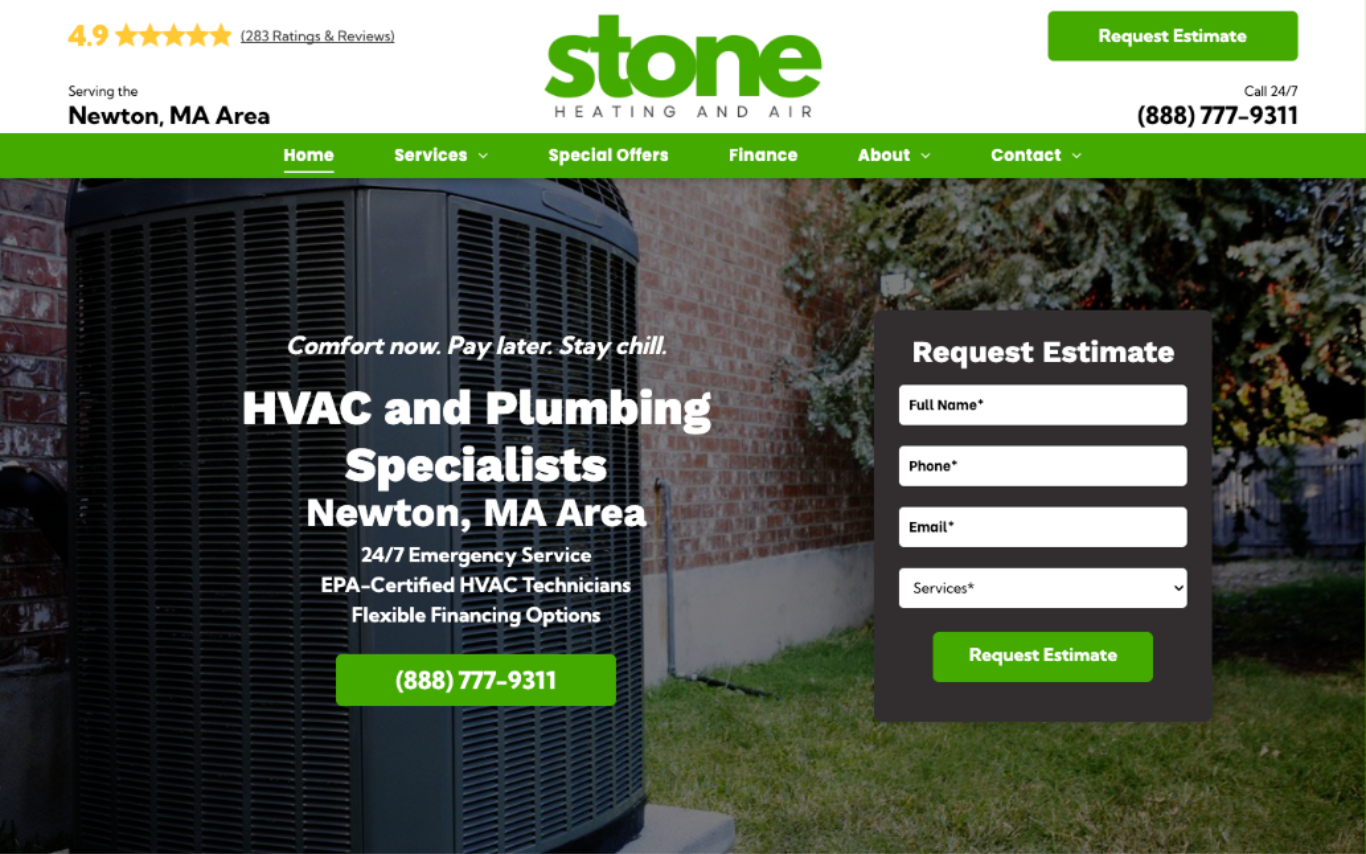
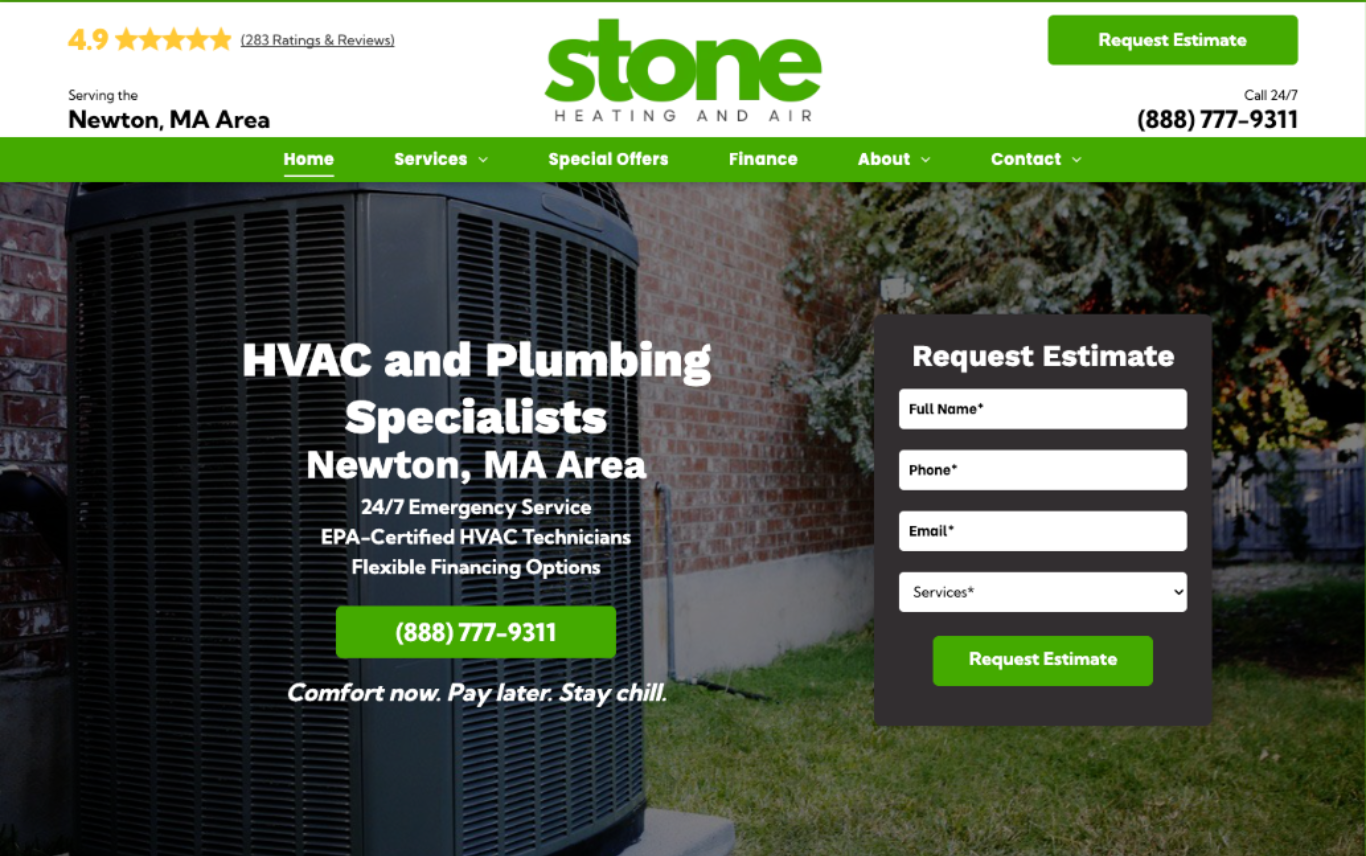
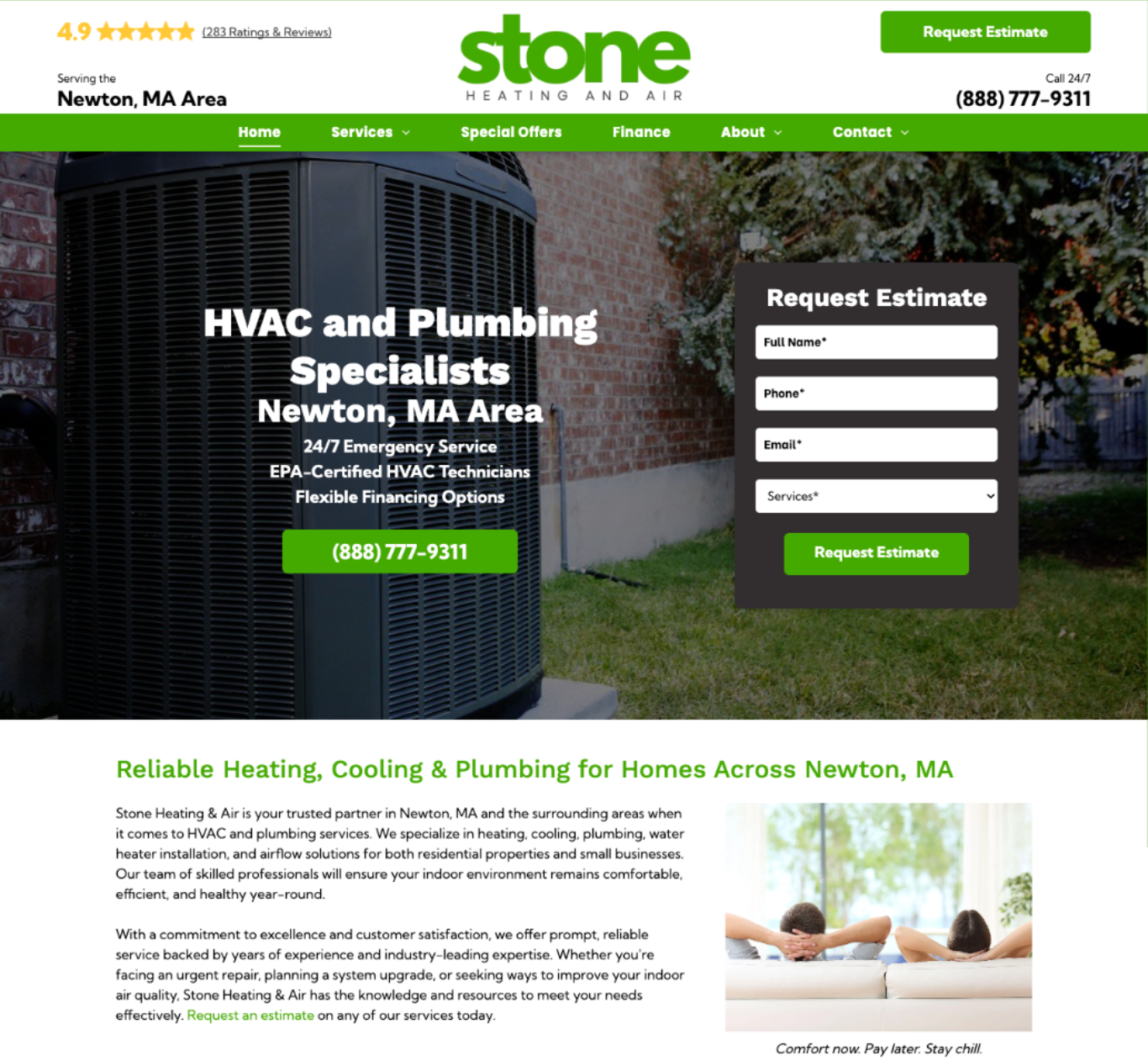
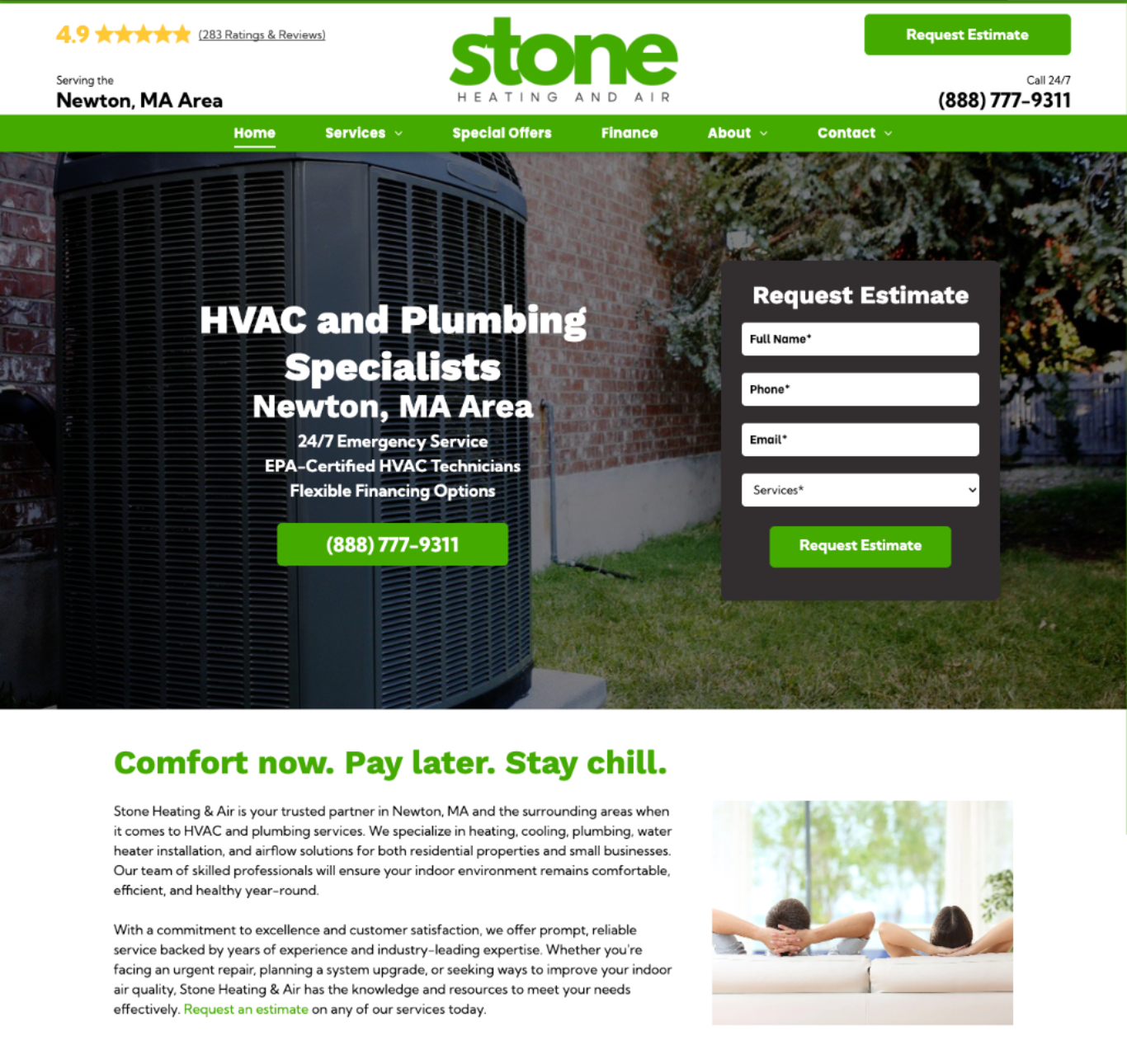
There are several approved, highly visible placements for taglines that keep them above the fold and in full view of visitors:
- Above the H1 headline in the hero
- Below the H1, below the CTA
- As a headline for the introduction copy
- As a caption tied to a client-supplied image -- included in the introduction or why choose us sections
These placements give the tagline room to breathe and ensure it’s read — not squeezed.
3rd-Party Website Reports FAQs
My client ran a NinjaCat or SEMrush report that says their site has a lot of issues — what should I say?
When customers or sales reps send third-party website audit reports (SEMrush, Lighthouse, W3C, etc.), these often include alarming warnings, red flags, and urgent language that can create unnecessary concern.
To help ensure consistent, accurate responses, please use the appropriate message below based on who submitted the report.
Client-Facing Response
Use this when the audit report is sent directly by a client.
We understand how concerning third-party website audit reports can look. When you see red warnings, exclamation points, and language like “must be fixed immediately,” it can feel like something is seriously wrong—even when your site is actually performing well.
These tools are designed to flag every possible recommendation, not just issues that meaningfully impact your website. As a result, many findings sound urgent but have little real-world effect, especially for small to mid-size business websites.
What we can help with
If a report identifies clear on-page issues like broken links, missing image alt text, or missing title or meta tags, we’re happy to review those and address them when appropriate.
What’s often outside our control
Some flagged items relate to things like off-site SEO signals, social media activity, third-party scripts, or platform-level code. These don’t necessarily indicate a problem and often can’t—or don’t need to—be changed.
The important thing to know is that not every warning requires action. We focus on updates that truly improve user experience, accessibility, and search visibility. If there’s something specific in a report that concerns you, we’re always happy to review it and talk through what actually matters.
Sales-Facing Response
Use this when the audit report is sent by a Sales Representative (SR).
Third-party audit tools (SEMrush, Lighthouse, W3C, etc.) are frequently used during competitive evaluations and often surface long lists of “warnings” designed to look urgent. In many cases, the goal is volume and intimidation rather than real impact.
These reports flag every possible best-practice recommendation—including items that have little or no effect on real-world performance—which is why they’re commonly used as scare tactics by competitors.
What Hibu can address
Clear on-page issues such as broken links, missing alt text, or missing/incorrect title and meta tags should be shared with our team for review and resolution where applicable.
What Hibu cannot control
Items related to off-page SEO signals, social presence, external scripts, platform-level code structure (including some heading hierarchy warnings), and third-party performance scoring factors are typically outside our direct control and are often low-impact.
Key takeaway
Not every flagged item requires action. Modern search engines and browsers tolerate minor warnings, especially on SMB websites. Our focus is on fixes that materially improve usability, accessibility, and search visibility—not chasing automated scores.
What should I say if a client runs a ChatGPT (or similar) SEO report?
ChatGPT doesn’t actually scan your site — it generates lists of common best practices and sometimes guesses wrong. That’s why its reports can sound alarming but don’t reflect real issues. Your Hibu Smart Site already has the core SEO built in: mobile responsiveness, fast hosting, and SEO tagging. If something like fresh content or reviews is flagged, that’s where we can focus together.
Plan of Attack for Reps
- Acknowledge and De-escalate – “I’m glad you’re looking at SEO — that’s why we manage these sites for you.”
- Clarify Tool Limitations – “ChatGPT doesn’t scan your actual site. It creates generalized lists of possible issues.”
- Reframe Platform Realities – “Every platform has trade-offs. Hibu’s advantage is that we handle hosting, updates, and security for you.”
- Highlight What’s Built-In – “Your site already follows Google’s core guidelines: mobile responsiveness, meta tags, alt text, and page speed are handled for you.”
- Acknowledge Valid Points – “Good callout — fresh content or reviews will help SEO. We can get that scheduled.”
- Bring It Back to Outcomes – “Are you actually seeing fewer leads, or just concerned because this report flagged something?”
- Offer Next Steps – “Let’s do a quick SEO tune-up: refresh content like more FAQs, testimonials (text-based or, even better, client video testimonials), before /after photos (if applicable), check SEO tags, and make sure everything’s in top shape.”
Key Takeaway
AI-generated reports like ChatGPT are not diagnostic tools. They provide broad lists of suggestions, many of which don’t apply to your site. Hibu Smart Sites already meet core SEO standards, and we focus on updates that actually drive results — faster performance, stronger visibility, and more leads.
What should I say if a client runs a Google Lighthouse or similar report?
Reports like Lighthouse or BBB flag technical items that sound serious but usually don’t affect how your site works, ranks, or generates leads. Even Google’s own sites don’t pass every test. Your Hibu Smart Site already meets the fundamentals: mobile-friendly design, fast hosting, and SEO tags. If the report flagged content freshness, images, or reviews, those are the updates we can act on.
More Information
- Acknowledge and De-escalate – “I’m glad you’re keeping a close eye on performance — that’s why we manage these sites for you.”
- Clarify Tool Limitations – “Reports like this scan everything, including minor technical items that don’t affect real-world results.”
- Reframe Platform Realities – “No site — not even Google’s — scores perfectly. What matters is performance, clarity, and conversions.”
- Highlight What’s Built-In – “Your site already includes the essentials: fast hosting, SEO tagging, mobile responsiveness, and alt text.”
- Acknowledge Valid Points – “Good callout — adding new content or reviews will absolutely help SEO and trust.”
- Bring It Back to Outcomes – “Are you seeing fewer leads, or are you just concerned because this report flagged something?”
- Offer Next Steps – “Let’s do a quick SEO tune-up: refresh content like more FAQs, testimonials (text-based or, even better, client video testimonials), before /after photos (if applicable), check SEO tags, and make sure everything’s in top shape.”
Key Takeaway
Automated reports like Lighthouse or BBB highlight technical details, but they rarely reflect what truly matters to Google or your customers. Hibu Smart Sites already meet core SEO and performance standards. Instead of chasing perfect scores, we focus on updates that actually drive results — faster speed, fresh content, stronger credibility, and more leads.
AI and Technology
Is my website optimized for AI-driven search and visibility?
Yes, your Hibu website is built with modern best practices that align with AI-driven search trends, ensuring strong visibility and user experience.
SEO & AEO (Answer Engine Optimization)
Your site includes SEO features and AEO-friendly content, such as structured data (schema markup), which helps AI and search engines understand and showcase your content effectively.
AI Crawling
AI tools like ChatGPT don’t directly crawl websites, but your site is optimized for search engines that AI platforms pull data from.
Q&A Content Benefits
Well-structured Q&A sections enhance visibility in AI-driven search results, as these systems prioritize clear, direct answers to user queries.
Your website is well-prepared for evolving AI search trends, helping improve its discoverability and relevance in AI-powered search results.
What is schema markup, and why is it important for SEO?
Schema markup is a type of code added to a website to help search engines understand its content better. It acts like a label for important information, such as business details, services, reviews, and FAQs.
Why is it important for SEO?
- Better Search Visibility: Helps search engines display more detailed results, like star ratings, business hours, or FAQs.
- Higher Click-Through Rates: Richer search results attract more attention, leading to more clicks.
- Improved Understanding: Makes it easier for search engines to connect the website with relevant searches, improving rankings.
- Optimized for Voice Search: Voice assistants (like Siri, Alexa, and Google Assistant) rely on structured data like schema to provide direct answers to spoken queries. Websites with properly structured schema markup are more likely to appear in voice search results, increasing visibility for potential customers.
Hibu websites include schema markup to enhance SEO and help businesses get noticed in search results.
What types of schema exist, and which ones are included in Hibu One websites?
Yes, there are many types of schema markup, each designed to highlight different types of content for search engines. Common types include Local Business schema, Article schema, Product schema, Review schema, and more.
Every Hibu Smart Site automatically includes the following schema types:
- Local Business Schema – Helps search engines display key business details like name, address, phone number, and hours.
- Website Schema – Provides search engines with general information about the website, improving overall visibility.
- Video Schema – Helps search engines recognize and display video content more effectively in search results.
- FAQ Schema – Structures frequently asked questions in a way that makes them eligible for featured snippets and voice search responses.
- Breadcrumb Schema - Structures the website’s internal navigation paths to help search engines understand site hierarchy. This enhances how page links appear in search results, often replacing URLs with a clear breadcrumb trail for improved user navigation and click-through rates.
These built-in schema types help improve search engine rankings, enhance visibility in search results, and optimize the site for AI-driven search experiences.
What is LLMS.txt File?
LLMS.txt is a special text file that allows websites to be understood more effectively by artificial intelligence systems and large language models. By being located in the root directory of your website, this file helps artificial intelligence systems such as ChatGPT, Google Gemini, Claude, and Perplexity to process the content of your site more accurately and efficiently.
What is the difference between the LLMS.txt and robots. txt files?
LLMS.txt and robots.txt are files that help optimize websites for different purposes. Both are located in the root directory of the website and have a machine-readable structure. However, their intended use and target audiences are different today. Perhaps in the future, it may be possible in a situation where it can be integrated into the robots.txt file.
3rd Party Integrations, CRMs, and Widgets
What solutions are available for real estate clients?
Integrating MLS/IDX functionality into Hibu One websites is challenging because our platforms is not designed for the complex requirements of MLS/IDX integration.
Here's why:
Platform Limitations
No Backend Access: Hibu websites operate as closed systems, so backend code modifications needed for MLS/IDX feeds are not possible. Limited API Support: Many MLS/IDX providers rely on APIs that Hibu websites cannot effectively utilize.
Dynamic Content Constraints
MLS/IDX feeds update frequently, requiring platforms that can handle real-time or near-real-time updates, which Hibu websites are not built to manage.
Compliance and SEO Issues
MLS/IDX providers have strict display rules, often requiring custom configurations beyond Hibu’s capabilities. Embeddable widgets, while an option, are typically SEO-unfriendly and may not offer the seamless functionality clients expect.
We can implement third-party widgets such as:
Important: When discussing MLS/IDX with clients:
- Be clear about limitations upfront
- Explain that widgets require separate subscriptions
- Note that clients must manage their own widget setup
- Mention potential SEO limitations due to iframe usage
- Emphasize that real-time updates may not be available
- Be aware that many of these platforms offer competing digital marketing services including:
- Website development
- Paid search
- Social media marketing
- SEO services
Exercise caution when recommending these solutions as they may lead to client migration to these platforms' full service offerings
Do you recommend an HTML app for a calculator?
Yes! Here are two great options for adding a calculator (cost estimator, area calculator, etc.) to a website:
A flexible calculator widget that allows users to input values such as square footage for heated space, garage space, and porch space to generate a rough cost estimate.
A user-friendly calculator tool that integrates seamlessly with websites and offers customization options to match the client's needs. Both options work well with Hibu websites and cost approximately $5/month. Keep in mind:
- The client will need to sign up for the service and configure their calculator settings.
- Once set up, they must provide Hibu with the embed code for implementation.
Can a Hibu One Website include an online scheduling tool for appointments and payments?
If your client is interested in adding scheduling functionality to their website, you can recommend any of the following scheduling apps. While they all perform the same core function, each app offers unique features tailored to different business needs. Encourage your client to review each option to determine which one best fits their requirements. All of these apps are fully compatible with Hibu Sites.
Calendly with Stripe Integration
Calendly is a popular scheduling tool that can be easily embedded into a website. It offers seamless integration with Stripe for payment processing. This combo allows you to set up booking slots, manage appointments, and process payments all in one.
Acuity is a comprehensive scheduling solution that includes built-in payment processing. It supports various payment gateways like PayPal, Stripe, and Square. It's highly customizable and offers features like automated reminders, calendar syncing, and more.
Ideal for small businesses, Square Appointments is not only a scheduling tool but also includes a robust payment system. It's particularly beneficial if you're already using Square for payment processing.
Setmore ( https://www.setmore.com/): This platform offers online booking capabilities with a simple, user-friendly interface. It integrates with payment solutions like PayPal and Stripe, making it convenient for service-based businesses.
Like any third-party app, your client will need to subscribe to the service, set it up, and then forward the embed code to Hibu.
Can a Hibu One website support a Square WooCommerce plugin for pre-registration and payments, or is there another way to accommodate this functionality?
The Square WooCommerce plugin is a
WordPress plugin, and Hibu One websites do not support WordPress plugins by default. However, Square typically offers integration alternatives—such as HTML or JavaScript-based widgets—that can be embedded into a Hibu website to provide similar functionality for pre-registration and payments. The client should review Square’s available integration options and supply the appropriate embed code for implementation.
What is the difference between a plugin and a widget?
A plugin is a software extension that adds specific functionality to a website’s backend, typically requiring installation and integration with the site's platform. Plugins are commonly used in content management systems like WordPress but are not compatible with Hibu websites.
A widget is a small application or code snippet that can be embedded directly into a webpage to display specific features, such as forms, booking tools, or payment buttons. Widgets typically use HTML or JavaScript and can be easily integrated into a Hibu website without requiring backend modifications.
Since Hibu One websites do not support plugins, clients should look for widget-based solutions that offer similar functionality.
Can I replace the contact form on my Hibu One website with a form from my CRM system like HubSpot, Salesforce, Zoho, or Pipedrive?
Many CRM systems allow businesses to create custom contact forms that integrate directly with their websites. If you choose to replace the existing Hibu form with a CRM-integrated form, submissions will be sent directly to your CRM for seamless lead management.
However, it's important to note that using a CRM-based form means Hibu will no longer be able to track form submission conversions. This could impact your ability to measure website performance and marketing effectiveness through Hibu’s reporting tools.
To determine whether your CRM supports customizable contact forms and how best to integrate them with your Hibu site, we recommend reaching out to Steer directly for detailed information. Their team can provide insights into the best approach to align your website and marketing efforts with their system.
Should Shopify be embedded directly into a Hibu One Smart Site?
We don’t recommend embedding Shopify directly into a Hibu One Smart Site.
Shopify is a large, resource-heavy platform. When it’s embedded into a website, it can slow the site down and negatively impact
Google’s Website Core Vitals. These performance scores are an important factor in how Google evaluates site quality and search visibility.
Instead, best practice is to link to the Shopify store from the website. This keeps the site fast, protects performance scores, and creates a smoother experience for visitors. It’s also very common—users are familiar with clicking a clear “Shop Online” button that takes them to a store on a separate page or domain.
Domains and Email
If a client wants to use their existing domain with our website service, will they still receive email hosting, including up to 26 email addresses and cloud storage for email content?
Hibu only hosts email accounts for domains we register for our clients. Since this domain wasn’t registered through us, your client will need to find an email hosting provider. Often, the domain registrar (like GoDaddy, if that’s where they got the domain) offers email hosting services. I’d suggest they contact the registrar for more details about their email hosting options.
If a client decides to cancel their Hibu website service, what happens to their website, domain, and any associated content?
When a Hibu One website account is canceled, the following procedures are in place:
Hibu One Website Ownership
The website, including all original content created by Hibu and any stock photos used, is owned by Hibu. This means the website itself cannot be transferred or taken to another provider.
Domain Ownership
If Hibu procured the domain name for the client, we will transfer ownership of the domain to the client at no charge. Once the transfer is complete, the client would be responsible for managing and renewing the domain with the registrar going forward.
If the client is using their own domain, even though Hibu is currently pointing it to our hosting servers, the client remains the owner of the domain. Should the client choose to move to another company or hosting platform, their new provider can update the domain’s settings to point it away from Hibu’s servers. We will not prevent this transfer from happening.
Access Post-Cancellation
After cancellation, access to the website and its content will no longer be available. If the client wishes to download or save any specific assets or data, we recommend doing so before the cancellation takes effect.
Our goal is to ensure this transition is as seamless as possible. Please feel free to reach out with any additional questions or for assistance during the process.
If a client is unable to transfer their existing domain, can we provide a Hibu domain instead? Is there any additional cost, and what are the next steps?
Yes, if the client is unable to transfer their existing domain, we can provide a Hibu domain at no additional cost.
Next Steps
- Contact the DSC to request the provisioning of a new domain.
- Once the Hibu-provided domain is set up, the website can go live using this domain.
- If the client later gains access to their original domain, they can update its settings to point to the Hibu website.
This allows the client to move forward with their website while still having the option to use their original domain in the future.
Can a client transfer their GoDaddy domain to Hibu’s domain management system to avoid paying GoDaddy, or do they need to continue renewing with GoDaddy?
The client will need to continue renewing their domain with GoDaddy if they want to keep the same domain name. Hibu does not transfer in existing domains, so the domain must remain with the original registrar. However, Hibu can help point the domain to the client’s website on our platform while they maintain ownership and renewal through GoDaddy.
Can a customer respond directly to the email notification from our website form fill, or do they need to create a new email?
No, our Email Notifications do not support direct replies. Instead, each notification includes a "Click here" link. Clicking this link will open a new email with the sender’s email address automatically populated in the To: field, making it easy to respond.