
Meet Hibu One
Your All-in-One Digital Marketing Platform
Hibu One is a powerful, AI-enabled platform that brings together everything small and mid-sized businesses need to succeed online—establishing your presence, generating quality leads, and helping you convert them into loyal customers. With modern design, smarter tools, and scalable features, it’s digital marketing made simple.
Here’s what’s included:
- A Hibu One Smart Site
AI-optimized for SEO and built to convert, your Smart Site is crafted with personalized content, clean design, and performance-first structure. - Unlimited Pages + Vertical-Specific Guidance
Add as many Smart Site pages as your business needs—guided by our built-in Recommendation Builder tailored to your industry. - Local SEO Power: Geo Pages & Service Area Pages
Expand your reach across key locations with optimized pages for either in-office or on-site services—whichever fits your business model. - Inbox: Smarter Lead Management
Consolidate calls, texts, chats, and reviews into one unified view—so you never miss a lead or lose context. - Instant Responders + AI Call Summaries
Automatically reply to missed calls and texts and instantly summarize recorded calls with AI—so you can stay efficient and informed. - Support for Multi-Location Businesses
Market multiple physical locations from one central platform—with synced listings, reviews, and local content. - Scalable for Growth
Add performance products, target multiple regions, and customize campaigns as your business grows—all from the same platform. - Customized Real-Time Notifications
Get customized notifications via email, text or web push for your leads and reviews – so you never miss an important event
Hibu One FAQs
What is Hibu One?
Hibu One is Hibu’s all-in-one, AI-enabled technology platform built to manage and grow a small business’s digital marketing program. It provides a complete digital presence, drives high-quality leads at the lowest cost, and streamlines lead management to help convert more customers and improve retention.
How does Hibu One help grow a business?
Hibu One empowers businesses to:
- Establish a full digital presence with a professional website.
- Attract more leads through Search and AI services (e.g., Google, ChatGPT).
- Convert more leads into customers, using tools like Inbox and AI call summaries.
- Retain customers by responding instantly and staying engaged.
What makes Hibu One different from previous Hibu solutions?
Hibu One includes everything from our previous Smart Online Presence solutions (with Assistant), plus enhanced capabilities and AI features not previously available. All in, it includes:
Hibu One Smart Site Features
- A new Hibu One Smart Site, optimized for traditional and AI-based search visibility.
- Unlimited Smart Site pages, with vertical-specific structure guidance via the Rec Builder tool.
- Geo Pages support for localized SEO targeting.
- Service Area Pages for stronger Local Ranking results.
- Additional Locations support, allowing multi-location businesses to run marketing from a single Hibu account.
Lead Management Tools
- My Inbox – a centralized hub for marketing events (calls, texts, chats, and reviews), improving lead response and follow-up efficiency.
- Instant Responders – sends automated texts to missed callers or texters to maintain engagement.
- AI Call Summaries – transcribes and condenses recorded calls into a summary and purpose to help quickly prioritize follow-up actions.
What is the Hibu One Smart Site and why is it important?
The Hibu One Smart Site is an advanced website solution:
- Built to maximize visibility on traditional Search engines (like Google and Bing) as well as AI Search services like ChatGPT, Perplexity, Alexa+, and Gemini.
- Offers scalable page capacity to grow with the business.
- Integrates with tools like Geo Pages and Service Area Pages for strong local SEO.
What should I expect to happen to site traffic and leads during a Hibu One upgrade?
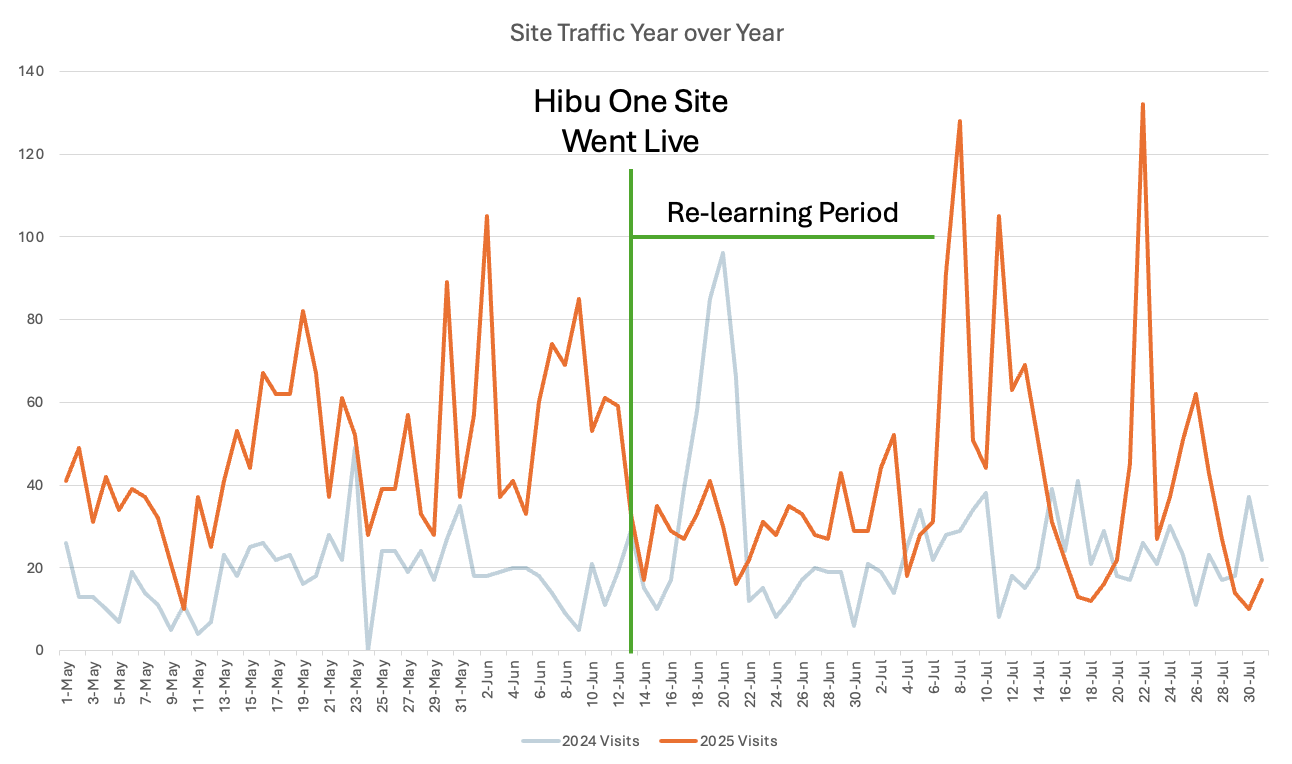
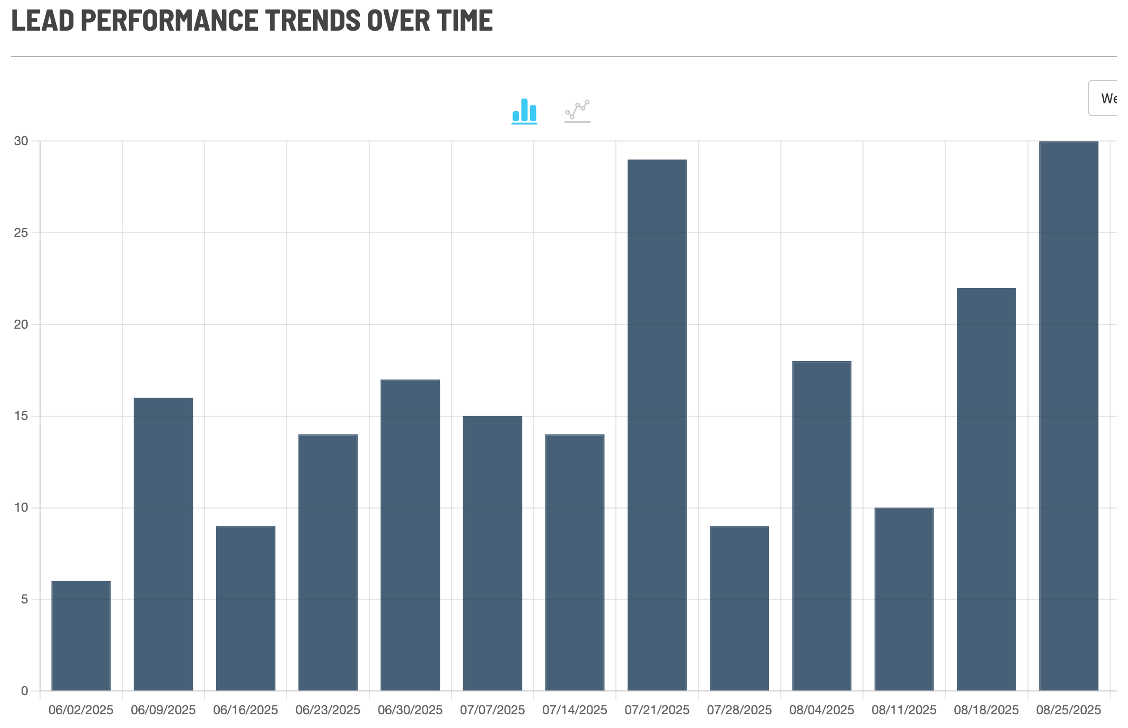
There is a “re-learning” period for Google when you update a site. In the case of Hibu One Sites, unless requested, the same domain is used and the old site is simply added to and updated, not taken down and replaced. This helps our sites experience a typical readjustment period of 7-10 days. During the "re-learning period", we also typically see leads stay consistent so the overall client impact is minimal.
How does My Inbox improve client performance?
My Inbox simplifies communication by organizing all key marketing activity in one place:
- Helps clients quickly identify important events, then respond faster and more contextually, saving time and improving outcomes.
- Prevents missed opportunities by making every call, text and conversation easy to track.
- Enhances productivity and conversion rates by consolidating important conversations.
What are Instant Responders and why do they matter?
Instant Responders means no more missed leads, winning you more business:
- Responds automatically and instantly to missed calls, texts and chats.
- Prevents missed opportunities by engaging the consumer and starting a conversation even when you’re busy.
- Helps convert more leads into customers, increasing your marketing ROI.
How do AI Call Summaries help business owners?
This feature uses AI to:
- Transcribe and analyze call recordings.
- Provide a concise Call Purpose and Call Summary.
- Enables business owners to quickly understand the call’s value and intent, so they can follow up more effectively.

Rec Builder
Rec Builder is the required planning and proposal tool for Hibu One and all Add-Ons. Sales reps use it to configure or update Hibu One, Local Ranking, and related products. It ensures accurate setup across all solutions.
Websites
Hibu One Smart Sites are a modern, AI-optimized website solution built to boost visibility, drive conversions, and support business growth. They outperform generic builders and serve as the foundation of your digital marketing strategy.
Local Ranking
Local Ranking helps your business dominate search results by improving both on-page and off-page SEO. It boosts visibility with expert site content, keyword optimization, social posts, backlinks, and more.
Service Area Pages (SAPs)
SAPs are dynamic, keyword-targeted pages that help businesses rank in local searches across multiple cities they serve. Ideal for businesses that travel to customers, each page targets a specific location and service.
Geo Pages
Geo Pages are location-specific web pages that help businesses attract customers from nearby cities. They expand local search visibility beyond the business’s main location. It’s a simple way to reach more customers in surrounding areas.
Listings
Listings ensures all your business information is correct and consistent across the web to make it easy for customers to do business with you.
Additional Locations
Hibu One’s Additional Locations lets businesses manage Listings, Reviews, and Reputation for multiple physical locations of the same brand. It requires a Hibu One Smart Site, with each location receiving a synced Location Page. Setup includes submitting a completed spreadsheet with the order in Salesforce/CPQ.
Inbox
Inbox is a Hibu One feature that streamlines lead management by centralizing calls, texts, chats, and reviews in one place. It shows full customer interaction history and includes AI Call Summaries and one-click response tools.
Instant Responders
Instant Responders in Hibu One send automatic text replies when a call is missed or a text is received, helping keep leads engaged. They’re easy to configure in the Hibu One Dashboard and appear in My Inbox as part of the conversation stream.
Assistant
Assistant is Hibu One feature that makes it easy to request reviews, feedback, and send special offers to customers.
Display
Hibu Display puts your business front and center with custom display and video ads on top sites like Google, Facebook, and Amazon. It helps you reach new prospects, drive traffic, and build brand awareness across mobile, desktop, and social platforms.
Social
Hibu Social turns your Facebook presence into a powerful marketing tool with targeted ads and expert setup. We build and optimize campaigns that reach your ideal audience and drive real results. From setup to reporting, we handle everything so you can stay focused on your business.
What Existing Smart Site Clients Could Be Missing
Depending on when your SOP Smart Site went live, you could be missing one or more of the following features:
Functionality
- Reviews Header Widget
- Contact Form in Header
- Blog Widget on All Pages
- Related Services Widget
- Recent Reviews Widget
- Form in Hero (Superhero)
- Instagram Gallery
- Google Calendar / Favicons
- Open/Close Widget
- Assistant Banner
Design
- Mobile Menu Design
- Transparent Header
- Sticky Header
- Desktop Hamburger Menu
- Color Palette Changes
- Callout Designs
- Coupon Designs
- Video Splash
Content
- Updated Headline Spec
- Updated Motivating Factors Spec
- Updated Title / Meta Descriptions Spec
- Added Reviews Content on Homepage
- Motivating Factors Section
- Word Count Increases
Contact Preferences
- Replace Call Buttons with “Call or Text”
- Replace Call Button with a Multi-Phone Button
Performance
- Speed Enhancements for Core Web Vitals
- Expand Site Width to 1200 Pixels
- Refresh all Widget Code
Hibu One Service Area Pages (SAPs) – FAQ
Service Area Pages (SAPs) are dynamic, keyword-targeted pages created to help businesses expand their presence across a wide geographic area. These pages are typically best for clients who
travel to their customers.
SAPs are designed to help these businesses rank in local search results for each individual city or town they service. For example, a business might show up for searches like:
- “AC repair in Berwyn”
- “Pest control services near Norristown”
Each page is tailored to a specific city and is automatically generated based on the
client’s selected services and service area.
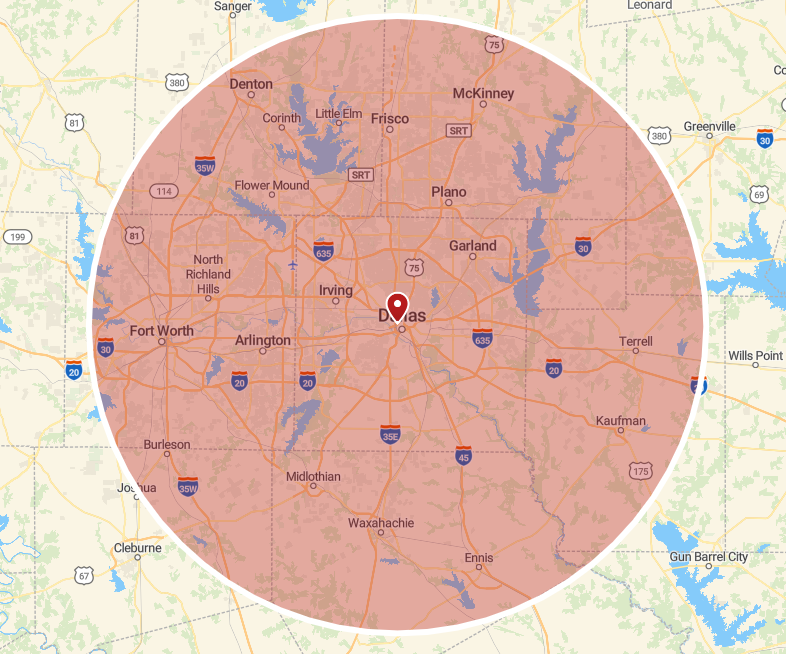
Service Area Pages are specified by selecting a radius from a central location (e.g. the business’ office location) and then selecting some or all of the towns listed which are within that radius. Currently, the maximum selectable radius is 40 miles, and up to 150 cities/towns within that radius.
SAPs are specifically designed and incorporated into Hibu One Smart Sites’ structure and navigation so as to not trigger “duplicate content” algorithms for Google and other search services. They have been extensively tested to ensure that they provide a material positive ranking benefit to clients with large service areas, and do not penalize those businesses with Google.
Example Demo SAPs
Hibu One Geo Pages (Geos)
Geo Pages are location-specific web pages designed to help businesses attract customers from surrounding cities. These pages
are typically best for businesses that have a fixed location or office that consumer travel to, and want to expand their visibility beyond the city they are located in.
For example, a dentist based in ‘King of Prussia’ might use a Geo Page to appear in search results for a neighboring (like Conshohocken), allowing them to connect with more potential patients. A Geo Page might look like:
- Dentist serving Conshohocken, PA
- Pediatric Dentist serving Bridgeport, PA
Whether a client wants to grow their business across county lines or simply pull in more foot traffic from nearby communities, Geo Pages are a simple, effective way to do it.
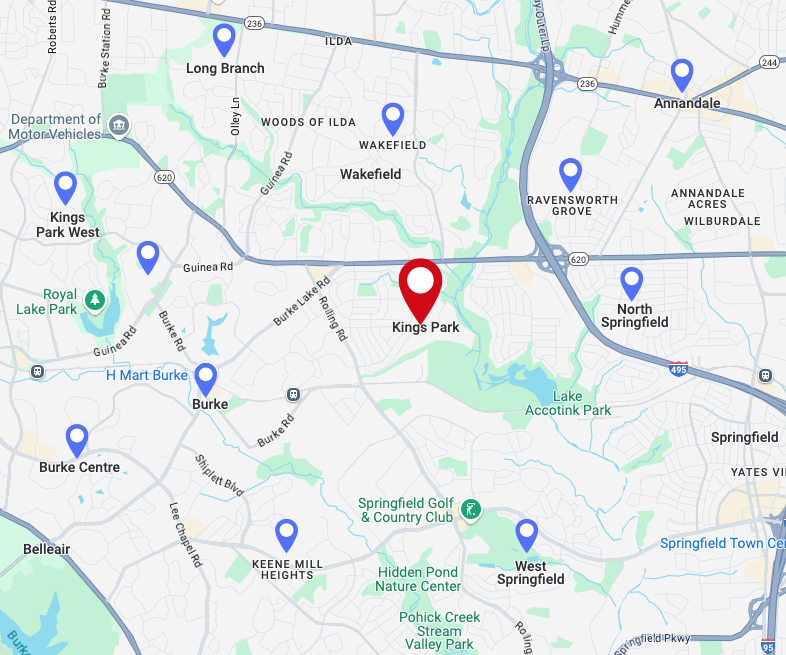
Hibu One allows for up to 10 Geo Pages to be specified for each account. Geo Pages cannot be added to an account which has Service Area Pages on it.
Example Demo Geos
Choosing Geo Pages vs Service Area Pages
As noted in the Service Area Pages and Geo Pages descriptions, these two offerings are both designed to help clients be found more easily by consumers within their service or draw areas. In general:
- Service Area Pages are an add-on to Local Ranking, and are designed for “come to you” businesses, where the business travels to the consumer’s place of residence to provide the service (e.g. landscaping, roofing, etc.)
- Geo Pages are separate from Local Ranking, and are designed for “come to me” businesses, where the consumer travels to the business’ office to get the service (auto repair, etc.)
These guidelines are not absolute, and there can be exceptions. One notable exception would be a legal firm which might utilize Service Area Pages even though the client would typically travel to the lawyer’s office to do business.
Note that you cannot purchase both Geo Pages and Service Area Pages on the same account, although Geo Pages can be purchased with Local Ranking if there are no Service Area Pages in play.
Additional Locations
Hibu One supports businesses with multiple physical locations, enabling us to manage the Listings, Reviews and Reputation for each additional location. This, in effect, means provisioning the legacy Online Foundation Solution (OFS) service (not including Assistant marketing automation) for each child location.
Selling Additional Locations is appropriate when a business has multiple physical locations of the same business, which are marketed through the same website (e.g. an auto repair shop with 3 locations around a DMA). It is not appropriate for a business owner who owns two or more distinct businesses with separate websites and audiences (e.g. a restaurant vs a party planning business).
Selling Additional Locations requires a Hibu One Smart Site to be included as part of the service. If the client opts out of the Hibu One Smart Site, you cannot add Additional Locations.
When you sell Additional Locations, you must utilize the spreadsheet that is available in Salesforce/CPQ to provide the details for each location, in addition to adding the Additional Location(s) to the Order. This spreadsheet must be included with the Order.
When you sell Additional Locations, each of these locations will have a Location Page on the Hibu One Smart Site. That page will by sync'd to that location’s Google My Business Page, so that business updates made via OFS will automatically be pulled into this page.
Example site with Additional Locations:
Howard Fine Howard Law.
My Inbox
My Inbox is a new feature of Hibu One which replaces the My Leads section of our Hibu Dashboard for Hibu One clients. My Inbox significantly enhances the lead management capabilities of Hibu One for clients.
My Inbox pulls in all of the most important marketing events for the business into one place. That includes tracked call, text messages, chats and reviews. These are all events which it’s important for the business owner to be aware of, and to react or respond to.
In addition, My Inbox consolidates these events at the Contact level. So, if a single consumer calls a business, texts the business, reviews the business, or chats with the business over the course of time, these different events are pulled together into the Conversation History and show as one communication stream. This means that when the business user is looking at the most recent call from a consumer, they can immediately see the history and context of that event and be able to respond in a more personalized and informed way – without having to look up information in other systems first. My Inbox also uses AI Call Summaries to make it even easier for the user to quickly gauge the importance of a new lead.
My Inbox also provides one-click mechanism for the business user to start a 1:1 dialog with the consumer, via text, call or email, as well as to request feedback or a review from the consumer with one click. This streamlines communication, saves time, and makes it easy to be responsive.
Note that sending text messages from My Inbox to consumers requires opting into the Assistant RCF, and completing A2P Registration, which can be managed through the Connections page under the Info & Tools section of the Hibu One Dashboard.
Instant Responders
Hibu One includes Instant Responders, which are designed to engage a consumer who’s contacting the business, even when the business staff are busy or unavailable. This helps to increase the conversion rate for new leads, as consumers are less likely to go elsewhere if they receive a response from the business they’ve contacted.
Instant Responders can be turned on or off, and configured, in the Info & Tools section of the Hibu One Dashboard. They can be set up separately for each of missed calls and text messages. Missed calls are calls that are either not answered, or that are answered by voicemail (whether or not a message is left).
In the case of both missed calls and text messages, an Instant Response is sent back to the consumer immediately in the form of a text message. The contents of this text message can be configured in the Hibu One Dashboard.
Instant Response messages appear in the Conversation History of My Inbox as part of the communication stream, so the business user always knows whether the consumer has received one. Sending an Instant Response often leads to the consumer texting back to the business, and such texts also then appear in the Contact History stream.
Using Instant Responders requires opting into the Assistant RCF, and completing the A2P Registration, which can be managed through the Connection menu in the Info & Tools section of the Hibu One Dashboard.
Call Summaries
Hibu One utilizes advanced AI technology to analyze each recorded phone call and extract the purpose and a brief summary from each call. [Note that this use of AI is under enterprise terms which protect the client and consumer’s data from being shared or used to train the AI LLM.]
Call Summaries enhance the utility of My Inbox by making it even easier for the business user to see what a call was about, whether it’s valuable, and how important it is to respond. Instead of having to listen to a call recording, or read through a text transcript, you can see at a glance what the consumer is calling about and – if the call was answered – what was discussed.
There are two elements of the Call Summary feature:
- Call Purpose, which is a very succinct statement of the reason for the call (e.g. “Request for a towing service”). The Call Purpose appears in the Conversation List section of My Inbox, associated with that event.
- Call Summary, which is a (typically) 2-3 sentence summary of the details and outcome of the call – for example, stating what service was requested, what if any pricing was discussed, etc. The Call Summary appears in the Conversation History section of My Inbox. Users can still access and search the entire raw transcript of each call, as well as listen to the call recording.
- Call Summaries are only available for calls which are tracked and recorded, so the client must have RCFs enabled and recording on. As a result, the Call Summary feature is not available for HIPAA businesses.
Guidance: Adding Performance Products to Multi-Location
Hibu One supports the capability to manage multiple physical locations (see Additional Locations). For clients with multiple locations who want to drive additional leads to their business using Hibu’s advertising services (Search, Display or Social), there are two ways to approach this:
- Add the performance product(s) to the Hibu One Parent location, and use the ability to run multiple geo-targeted campaigns within each ad product to drive leads to the distinct locations.
- Add the performance product(s) to each location separately – which entails selling each child location as a distinct Salesforce account.
In most scenarios, selling performance products to the child location(s) as a separate account will be the preferred strategy. Separate accounts allow for unique budgets for performance products by location, providing our clients with location level reporting, location level lead tracking and more flexibility to manage their Hibu marketing.
Benefits of selling child location(s) as a separate account:
- Dashboard reporting by location.
- Increased Flexibility: Manage budgets, start dates/end dates by location. Turn up/down budgets based on need by location. Start/stop performance products based on location need.
- Performance results and lead results exist at the child account level.
Cons of selling child location(s) as a separate account:
- Requires more time to review reporting details and manage your Hibu marketing. (For example: No single rolled up view of lead performance).
- Performance variance. It's possible that one location might outperform another - leading to questions or concerns from clients.
- When making changes to one location we need to consider if those changes impact the ads and ad copy for other locations. While this is true even if sold all under the parent, navigating across accounts leaves more opportunities for human error.
When would I sell performance products for multiple locations all under the parent account?
- If a client doesn't care where lead volume originates from and just wants to manage a single performance budget.
- If a client is ok with, or prefers, that performance budget gets shared across locations.
Onboarding Considerations
If you sell Hibu One to a multi-location business and separately sell Hibu performance products to one or more child locations, you will likely want to consolidate the consultations. You should notify the DSC at the time of consult that you have multiple accounts to do together. This will Be accommodated if possible. Try to avoid doing such consultations late in the day, when the DSC may run out of time.
When performance products are sold to a child location, and the parent location has a Hibu One Smart Site which will be the destination for those campaigns, Operations will not set the child location performance product live until the Smart Site is set live – same as with the parent location, or a standard non-multi-location account.